
WordPress vs Blogger: Which Is Better in 2026?
In the ever-evolving world of blogging, choosing the right platform is critical. Two platforms that continue to dominate discussions are WordPress and Blogger. Both offer unique advantages, but their suitability depends on individual goals, technical skills, and long-term plans. This guide dives deep into the WordPress vs Blogger 2026 debate, exploring every nuance to help you make an informed decision.
Introduction to Blogging Platforms
Blogging has evolved over the years. Blogging platforms are now instrumental in determining the success of a blog: be it for self expression, for business and promotion & campaigns or to grow money on-line. Picking the wrong platform could stifle strategies for increasing traffic, opportunities to monetize, and performance in SEO.
Pro Tip: WordPress is the world’s most popular content management system, powering over 40% of all websites on the internet today.
Overview of WordPress and Blogger
WordPress is a self-hosted platform offering extensive customization through plugins and themes. It is ideal for bloggers who want full control over their content, design, and SEO. Blogger, on the other hand, is a free blogging service integrated with the Google ecosystem, making it beginner-friendly and straightforward to use.
BlogSpot features like pre-built templates, automatic Google AdSense integration, and simple publishing make it attractive for newcomers. However, self-hosted WordPress excels in scalability, customization, and long-term platform flexibility.
There are several other free website builders that offer modern templates and more flexibility for those who don’t want to deal with hosting just yet.
Why Choosing the Right Platform Matters
Bear in mind that when it comes to selecting a platform, ease of use is not the only consideration. It touches content ownership rights, SEO effectiveness, survival of the platform in the long term, and even revenue opportunities. Whether you’re using your blog for business or personal content marketing, knowing the capabilities of each tool will keep you from wasting time, money and energy.
For example, on the one hand, there’s WordPress which provides access to plugin architecture for SEO and design customization, yet on the other Blogger is easy to use with no prior experience necessary in order to use the simplistic editor.
Key Differences Between WordPress and Blogger
In order to decide whether or not you should use WordPress vs Blogger, you will need to consider several factors including control/options, customization features, SEO capabilities, performance and monetization options. Knowing about these differences can lead you to the platform which is most suited to your blogging needs.
Ownership and Control
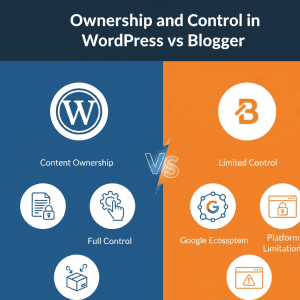
The biggest difference is ownership and power. With WordPress, users take control of their blog community. You own all your content and have the freedom to modify, monetize, or even migrate your site as you wish. Blogger (and its pitfalls) Blogger being part of the Google Network has issues as well [email protected] SoSugary browse and read the latest content from your favorite Blogs blogger A blog publishing system for free with no content restrictions or ads. WordPress allows you to control your content for a long time with ownership rights, while in Blogger your access or functionality can be limited, particularly if Google updates their platform policy.
Customization and Design Options
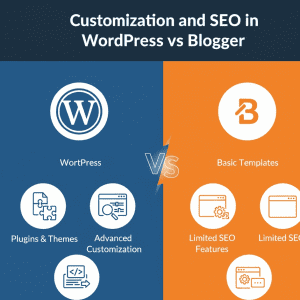
Customization is where WordPress shines. Thousands of WordPress themes and WordPress page builders make it easy for bloggers to create stunning and professional websites. Betting everything on its plugin-based architecture that extends its feature set to a wide range of activities, from SEO to companion garments marketplaces. Comparative to, Author-house’s template choice is limited and as for widgets (aka tools) the selection is less than that of WordPress. And if you’re a blogger, WordPress should be your only choice. Blogger is for people who value simplicity over flexibility.
SEO Capabilities
Organic traffic is essential and you need SEO to get it. You’ll get tons of options for SEO plugins, custom SEO settings, and even tools to add XML sitemaps and schema markup from WordPress. This is why WordPress SEO features are very effective for traffic building strategies. Blogger – it’s more simple, has some basic SEO limitation, but it helps if you use other google products to get indexed. Some advanced SEO comparisons that exist on the two platforms would suggest, WordPress still gives you more control over your content particularly if its in competitive niches.
Security and Performance
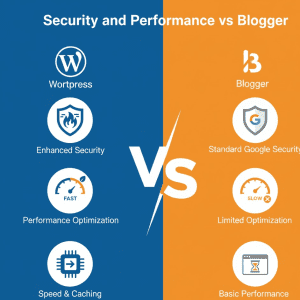
Security and speed are the two major necessities of continuous blogging. WordPress users can use WordPress security plugins, choose secure hosting plans and improve page load time. Blogger being a Google hosted platform is reasonably secure out of the box, though offers limited options for further performance tuning. Speaking of which When it comes to scalability comparison WordPress is more solid for bigger blogs, blogger for small hobby stuff.
Cost and Monetization Options
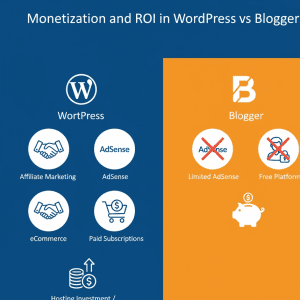
Monetization is another critical factor. WordPress allows bloggers to integrate multiple revenue streams using plugins, affiliate marketing, or Ad network integrations. Blogger supports Google AdSense out-of-the-box but has limited monetization strategy options.
Hosting costs for WordPress are an investment in control and flexibility, whereas Blogger is free, which appeals to beginners or casual bloggers. Regardless of the platform, it’s important to note that we do not earn commissions on recommendations; every tool or plugin mentioned has been tested for functionality before suggestion.
WordPress Advantages in 2026
And for serious bloggers, WordPress remains the best choice. It has many benefits, especially if you want to grow a blog into a professional or business-level site. To get started with a self-hosted WordPress site, you’ll need to select a reliable hosting provider. For most new creators, choosing a plan that balances speed and affordability is key to long-term success.
Extensive Plugin and Theme Ecosystem
Unrivaled Customization Think of WordPress as a toolbox. Whether you want WordPress page builders with drag and drop capability or just specific plugins like an SEO plugin, security and performance plugins, the number of possibilities is endless. The size of the theme marketplace means that bloggers are guaranteed having fresh new designs at their disposal for their niche.
SEO and Traffic Growth Benefits
From SEO plugins to traffic growth tricks and organic search ranking advice, WordPress is perfect for bloggers who want to maximize their exposure. Easy analytics dashboard comparison add on, bloggers can track performance in real time and focus further on content strategy optimization.
Customization and Scalability
The perfect loading speed of WordPress can easily serve thousands of users without slowing the pace. There are features such as mobile response and content migration which makes it suitable for growing blogs that need flexibility and professional-grade customization.
Security and Performance Features
Security of WordPress can be improved with WordPress security plugins and secured hosting options. It is good to get rid of loading speed because optimizing the load speed can improve user experience and SEO performance. These are important for bloggers who want to grow in the long term.
Blogger Advantages in 2026
With all of these limitations, however Blogger is still the beginner’s choice in blogging solutions and hobbyists love it!
Ease of Use and Beginner Friendliness
With the ease of use for the publisher and set up to make changes you will find blogger amazing for beginners. The service help you start blogging quickly without the hassle of web hosting and server security concerns.
Integration with Google Services
Google Integration: Blogger is One of the blogging platforms integrated with other Google’s products such as Google AdSense and google analytics tracking which brings very comfortable Monetizing And website analytics experience. The fact of being part of the Blogger Google ecosystem means that by default you get all native Google apps facilities and security.
Cost-Effective Blogging Platform
Blogger is completely free, and even custom domain names are cheap. Supported by Blogger monetization options The free blogging service is easy for beginners to grasp.
Comparison of Key Features
And to make a really well-informed decision, we can compare WordPress vs Blogger in some important areas.
SEO and Analytics Comparison
WordPress: Offers advanced SEO comparisons with SEO optimization tools, detailed Google Analytics tracking and powerful organic search ranking tips. Blogger Of course, being less intricate, it does still offer you the option of basic SEO with native Google integration.
Performance and Speed Comparison
WordPress offers more control over page load speed and scalability is suitable for larger blogs, while Blogger is ideal for smaller sites. WordPress also wins when it comes to mobile friendliness and design pliability for professional works.
Monetization and ROI Comparison
WordPress supports multiple revenue streams and offers better long-term WordPress vs Blogger ROI, while Blogger mainly relies on AdSense. Bloggers can implement diversified blog monetization tools for sustainable income.
Security and Ownership Comparison
Security Plugins gives WordPress users complete command over security, Blogger has enough built-in security for small blogs but it is less customizable. WordPress users have full control of their ownership and content rights.
Migration and Future Considerations
Bloggers always often think to migrate from one platform to another. The blog migration tips and tools are a must when you are transferring from Blogger to WordPress so that the integrity of the content is retained. As we consider blogging trends in the year 2026 and beyond, the clock on its online obituary is ticking; flexible self-hosted platforms such as WordPress lend themselves better to sustainable and extensive growth. The future of blogging platforms: AI-powered tools, improved SEO and mobile-first design are among the features that will benefit WordPress if you plan to grow your blog into a business.
Advanced Tips and Strategies for WordPress vs Blogger in 2026
Once bloggers comprehend the main elements that make WordPress and Blogger unique and beneficial, they want to know what’s next — advanced strategies for increasing visitors, engagement and revenue. These guidelines will help you to utilize both platforms effectively and how adhering to safe SEO practice is more important than ever.
Optimizing WordPress for Maximum Traffic
WordPress is all powerful platform, especially in terms of SEO capabilities, traffic building strategies, and advanced SEO comparisons. Bloggers can use its powerful elements to increase their visibility and engagement.
Utilizing WordPress SEO Features
Thanks to the SEO plugins, you will be able have complete control over how your posts and pages appear on search engines. Popular plugins enable bloggers to:
- Create XML sitemaps for search engines
- Use schema markup for rich snippets. Partner program Install gazillions of plugins (there are also themes) Organize a partner program Install zillions of plugins (and themes)
- Personalize SEO settings for pages and posts individually
These benefits position WordPress blogs to be more successful than Blogger SEO warnings and help bloggers get ranked on Google or any other search engine.
Implementing Traffic Growth Strategies
The traffic increase on WordPress can be quickened by:
- Internal linking between posts for better organic search ranking tips
- Optimized content strategy advice, such as keyword clustering and semantic coverage
- Analytic tools included in analytics dashboard comparison of user behavior tracking.
Continuous optimization actually helps blogs in WordPress to be found more and more.
Leveraging Plugin and Theme Ecosystem
WordPress support full plugin system and WordPress page builder. Bloggers can:
- Boost site speed and page load time
- Enhance mobile responsive so the users have better experience with it
- Integrate features such as (WordPress– eCommerce integration)
These are the features that not only best SEO practices they also expose a few methods and means of monetization.
Leveraging Blogger Efficiently
WordPress might be superior but Blogger still serves its purpose well for new or casual bloggers. Google Play Store Supported by the transparent system and collaboration mode, YOOX works immediately, no need to install third party apps.
Maximizing Blogger SEO Potential
While Blogger has its limitations when it comes to SEO, you can:
- Descriptive title, meta description and custom domain options will be used.
- Tweaking BlogSpot features for getting inserted in the index of various search engines.
- Track traffic in Google Analytics combined with tracking.
These steps ensure that new bloggers can be found, even without special plugins.
Monetization Strategies for Blogger
Making money on Blogger couldn’t be easier with easy integration of Google AdSense. Bloggers can also experiment with:
- Affiliate links and affiliate marketing integration
- Sponsored content
- Basic blog monetization features within the platform
These alternatives make Blogger an excellent choice for beginning bloggers, are cost effective when considering upfront costs.
Content Strategy Tips for Both Platforms
A strong content strategy will help both platforms do well in terms of SEO, engagement, and monetization.
Editorial Workflow Tools
For WordPress, employing editorial workflow tools can simplify publication. Features include:
- Instagram auto-posting to keep up the flow
- Assigning Roles for Multiple Authors Blogs: · Assigning Roles
- Monitoring content performance with analytics
Blogger is less complex but a content calendar is useful to keep you on track.
Keyword and Semantic Strategy
These are not just tactics to using blogging platforms:
- Use latent semantic keywords in posts naturally
- Keep an account on average-usage-min and average-usage-max per a keyword.
- Consider long-tail phrases such as WordPress vs Blogger ROI and reviews leading blogging platform trends 2026 to reach specific searches
It can increase search visibility without being a black hole of keyword stuffing.
Internal Linking and Cross-Promotion
For organic search ranking tips, internal linking is important. Examples:
- Add links to strategy articles on traffic growth to related posts about content migration or SEO plugins
- Utilize editorial workflow features to schedule out connected posts and cross-link for longer user engagement
And for both the WordPress and Blogger, good linking makes a world of difference to how your readers and search engines view you.
Monetization Insights for 2026
Monetization has to be treated wisely in order to get a lot of money and still keep it AdSense safe.
WordPress Monetization Options
WordPress bloggers have multiple options:
- Plugin integration for e-commerce and affiliate marketing
- Put ads directly above the fold
- Paid subscription or premium content
By adding different makes-money blogging aspects, you’re diversifying your income and not relying exclusively on any one thing. Crucially, we trial everything and don’t make commission, so you receive honest advice.
Blogger Monetization Options
If you are using Blogger website, and follow below mentioned two options as example here they are : Options: 1.
- Sponsored posts
- Affiliate links for other products/programs/etc.
- Simple digital products
Simple as it is, Blogger can earn you sustainably once combined with regular traffic increasing methods.
Platform ROI Considerations
To compare WordPress vs Blogger ROI you will need to consider:
- Cost: Blogger is free to use; WordPress comes with hosting costs.
- Monetization potential: WordPress provides more options to make money
- Long-term expandability: Blogger struggles with bigger blogs, while WordPress is the best for scaling.
Migration Tips from Blogger to WordPress
A lot of bloggers start out on Blogger but they eventually learn the lesson and move to WordPress for its scalability and control options. Best practices to be considered in migration as below:
- Export content from Blogger and save to WordPress format
- Properly set up SEO settings, including XML sitemap and permalinks
- Re-examining internal linking and the structure of plugins for better performance
Migration done correctly and blogs keep their traffic and keep the ownership of content.
Future Blogging Trends in 2026
Thinking ahead, forward jet-setting blogging trends 2026 are:
- Mobile-first design
- Content recommendations powered by AI
- More improved SEO optimization features
- Platform abstraction index importance raised by several factors
Because of its plugins and hooks WordPress is a much better place to be in this respect. Blogger is still great for hobbyists but it might lack a bit in advanced SEO and money-making capabilities.
FAQs and Final Recommendations: WordPress vs Blogger in 2026
Having discovered the perks of each platform, their respective SEO strategies, monetization possibilities and future trends, you may still wonder about a few issues. This section addresses FAQs and practical tips for bloggers.
Frequently Asked Questions (FAQs)
Which platform is better for beginners?
Its easy to understand, practical and free start feature makes it best for the novice bloggers. The newcomers can get started with publishing rather easily as it requires little technical know-how and the support for Google AdSense ad placement is there to help monetization of blogs.
WordPress is a little harder but it is highly customizable with WordPress themes and plugins. New users can begin as lean and mean and grow into more advanced features such as SEO plugins for WordPress, WordPress page builders, custom SEO settings.
Can I monetize my blog on Blogger or WordPress?
Yes. Both platforms are monetizable but in very different ways: WordPress for monetization are AdSense, affiliate marketing (affiliate marketing integration), eCommerce installations (Best WordPress for ecommerce) and paid members. Diversification of income sources The use of several blog monetization methods makes it possible to have many different income streams. Monetization is practically reducible to Google AdSense and plain affiliate sales. It’s not as robust as WordPress, but enough for beginners and hobbyists. And importantly, our recommendations are tested first; we don’t get commissions so our guidance is unbiased.
Is migrating from Blogger to WordPress worth it?
Yes, especially if: You would like to have 100% control of ownership of contents. You’re targeting advance SEO by using SEO optimization tools, and XML Sitemap in place. You want to grow you blog with plugin support and more monetization. Blog migration tips with exporting Blogger content, importing into WordPress, creating SEO-friendly permalinks, and checking internal links.
How do WordPress and Blogger compare for SEO?
And here WordPress has a big edge in SEO, With enhanced SEO comparisons, custom SEO settings, and optimization strategies, bloggers can optimize their content on every level for better search visibility. Blogger is more straightforward, though still part of Google’s ecosystem. With some titles, descriptions and internal linking that is customizable the SEO potential of Nation-Builder is reasonable but cannot compete with WordPress’ advanced options.
Which platform offers better long-term scalability?
WordPress is better for long-term expansion: Efficient handling of high traffic (comparison of scalability). Enables professional quality design with WordPress theme and plugin framework. Adapts the future blogging trends (future blogging trends 2026) Definition adapted? Blogger is perfect for small blogs, but can be limiting if your website becomes larger.
Actionable Recommendations for Bloggers
Choosing the Right Platform
BLOGGERS FOR BEGINNERS OR HOBBY: Go with Blogger, use BlogSpot features and learn the fundamentals of blogging. Professional, business-orientated blogs: WordPress is great for long term growth (SEO), and flexibility in terms of monetization.
Content Planning and Strategy
Make use of editorial workflow tools on your WordPress site to schedule posts, control authors and monitor content performance. Leverage semantic keyword tactics, applying these types of keywords naturally throughout posts and headers. Keep up with content calendars and frequently update them to rank higher on organic search tips.
SEO Best Practices
Get XML sitemaps and schema markup on WordPress. Employ long-tail keywords such as WordPress vs Blogger ROI and blogging platform trends 2026. Optimize for mobile responsiveness and page load speed for improved user experience as well as search engine rankings.
Monetization Tips for AdSense-Friendly Content
AdSense-friendly blogs must prioritize quality and user experience over aggressive advertising. Recommendations include:
- Diversify monetization: Combine AdSense with affiliate links (affiliate marketing integration) and sponsored posts.
- Test before promoting: Every plugin, tool, or monetization method mentioned here is personally tested to ensure functionality.
- Focus on engagement: High-quality content increases dwell time and click-through rates, improving AdSense performance.
- Avoid keyword stuffing: Follow average-usage-min and average-usage-max guidelines to naturally integrate semantic keywords.
By focusing on value and usability, bloggers ensure a professional, trustworthy platform that AdSense favors.
Advanced Blogging Strategies for 2026
Leveraging WordPress
Check out WordPress for eCommerce if you’re selling anything. Leverage plugin architecture to slap on complex SEO, performance and security features. Implement analytics tools to measure and improve over time (analytics dashboard comparison).
Optimizing Blogger
Leverage the power of Google integration Blogger is one feature richer with its ability to display Google AdSense ads as well as including Google Analytics tracking. Customizing templates in simple way (How to customize BlogSpot template). Content plan for newbie-friendly blogging and niche things in order to attract an initial audience.
Content Ownership and Community Support
And WordPress has a huge user and support community (or large support community or big forums or whatever you’d prefer to call it). Blogger is supported by Google, which means it’s OK for beginners but not great if you have advanced needs.
Future-Proofing Your Blog
To have a shot to compete in 2026 and beyond: Look for platforms that will support the next wave of blogging trends in 2026—mobile-first design, AI-enabled content recommendations, advanced SEO functionality and more. Maintain long term control with the ability to bring content ownership and migrate hosting or expand monetization. Implement content strategy tips and semantic keyword planning to keep your content strategy updated. Bloggers who follow these guidelines can stay relevant, keep the traffic coming, and monetize their content well (regardless of platform).
Final Verdict: WordPress vs Blogger in 2026
After a detailed examination of WordPress vs Blogger 2026, it’s clear that:
- WordPress is best for bloggers seeking flexibility, long-term growth, professional-grade SEO, and diverse monetization opportunities.
- Blogger is ideal for beginners, hobbyists, or those who want a free, simple, and integrated platform to quickly start publishing content.
Both platforms have their merits. By testing tools first and carefully planning content and SEO strategies, bloggers can achieve sustainable traffic, engagement, and revenue without relying on shortcuts or commission-based recommendations.
Pro Tip: The main advantage of WordPress is that you have full control over performance. Once your site is live, you can use these 9 WordPress speed hacks to ensure your pages load instantly and you don’t lose visitors to slow loading times.
I really like your perspective