
Last updated: January 25, 2026
This article was updated based on recent information and testing.
10 Free Tools to Help You Organize Your Work and Stress Less (2026)
Staying productive in 2026 is no longer about working longer hours. It is about working smarter, staying organized, and protecting mental well-being. With rising workloads, constant notifications, and remote work becoming the norm, professionals actively search for free tools to organize their work and reduce stress without paying for expensive software.
This guide explores 10 free productivity tools that help individuals and teams plan better, stay focused, and build calm, repeatable workflows. Each tool listed below has been carefully reviewed for usability, reliability, and long-term value.
Transparency note: This article does not earn commissions from any tool mentioned. All tools are tested or evaluated based on real-world usage, user feedback, and practical productivity benefits before being recommended.
Why Free Productivity Tools Matter in 2026

The 2026 need for productivity tools isn’t shrinking as work goes more digital and gets more fragmented. To try to coordinate, many end up juggling between desktop and mobile, multiple mail applications or project management apps and calendars scattered across inboxes and websites – causing more stress with an increased risk of burnout.
The best free productivity apps are those that help users:
- Organize work schedules clearly
- Track tasks without mental overload
- Reduce workplace stress through structure
- Improve focus and efficiency
When we can see and plan work and it is well organized, decision fatigue goes down and planning our day becomes far less overwhelming.
What Makes a Good Free Work Organization Tool?
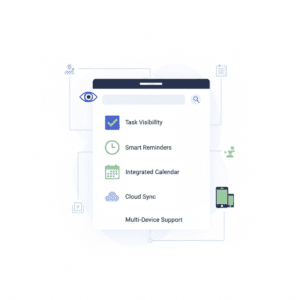
Before looking at the tools, it is essential to make a distinction between what constitutes useful tools versus distracting ones. A good free organization tool for your work should:
- Clear task and project visibility
- Simple user interface
- Reliable task reminders and alerts
- Installation and Multi-platform support with cloud based task managers
- Minimal setup time
Systems that automate workflow and provide rudimentary calendaring generally are the best for reducing lifelong stress. This aligns closely with proven strategies for building repeatable systems, as explained in our guide on 7 Easy AI Tools Anyone Can Master Fast & Stress-Free.
Tool #1: Todoist – Simple Task Management for Daily Clarity
Todoist has always been a favorite amongst the free task management apps for individuals and small teams.
Key Features
- Task lists with due dates
- Priority levels for better organization
- Natural language input, such as “Finish report tomorrow”
- Works across desktop and mobile
Why It Helps Reduce Stress
Todoist helps you, by offering a fast and simple way to capture and organize everything in Your head, sharing ideas and projects. It’s particularly nice for anyone who needs a super-simple to-do app (free) without the complexity.
Pros and Cons
| Pros | Cons |
|---|---|
| Easy to use | Fewer advanced features in its free plan |
| Fast task entry | No built-in project analytics |
| Reliable reminders | Collaboration tools are basic |
It’s best for: People with hectic work schedules who want to minimize daily stress.
Tool #2: Trello – Visual Project and Task Organization
Trello is a simple to use, free and visual way to organize any task or project. Trello is a free visual project tracking system – it’s boards, lists and cards, but for projects.
Key Features
- Drag-and-drop task boards
- Custom labels and checklists
- Shared boards for collaboration
- Visual workflow tracking
Why It Helps Reduce Stress
Trello makes progress visible. Most people love watching that checklist, those tasks move from “To Do” to “Done.” Such a simple activity gives everyone a sense of control AND accomplishment, and that is powerful when people are feeling stressed at work.
Pros and Cons
| Pros | Cons |
|---|---|
| Extremely visual | Can become cluttered |
| Easy collaboration | Not ideal for complex projects |
| Flexible workflows | Limited reporting features |
Best for: Teams, creatives and visual thinkers in need of free collaboration tools.
Tool #3: Notion – All-in-One Work Organization Platform
Notion Notion is a cloud-based task manager that enables users to manage everything in one place including notes, tasks, databases and documentation.
Key Features
- Customizable pages and databases
- Task lists with priorities
- Shared workspaces
- Workflow templates (free)
Why It Helps Reduce Stress
Notion makes information centralized, which means there’s less bouncing between apps. For those who like structured systems, it encourages calm and repeatable productivity systems.
Pros and Cons
| Pros | Cons |
|---|---|
| Highly customizable | Learning curve for beginners |
| All-in-one solution | Can feel overwhelming |
| Strong organization options | Requires setup time |
Best for: Advanced professionals working on complex projects or knowledge-intensive work.
Tool #4: Google Calendar – Time Management Made Simple
The fourth tool is one each of us should be using every day. Google Calendar is still a free and easy way to schedule meetings.
Key Features
- Event scheduling and reminders
- Time blocking support
- Sync across devices
- Integration with productivity apps
Why It Helps Reduce Stress
Calendars make time visible. Combined with time blocking software and that used in conjunction with realistic scheduling, so you’re not accidentally over-booking yourself, Google Calendar can help prevent you falling into the trap of over-indulging yourself on what really are your wants.
Pros and Cons
| Pros | Cons |
|---|---|
| Easy to use | Limited task management |
| Strong reminders | No project tracking |
| Works across devices | Not ideal for complex workflows |
Best for: Business professionals who could use better control over their time and meetings.
Tool #5: Clockify – Free Time Tracking for Better Focus
If you always find yourself on the run and short of time to track your productivity, apply this free application and add some rhythm to your work. Clockify is a free time tracker and reporting app for those looking to track the way your team spends their time.
Key Features
- One-click time tracking
- Weekly productivity reports
- Project and task tracking
- Unlimited users on free plan
Why It Helps Reduce Stress
By tracking time, users can see where they are not efficient and what kind of work load they can handle. This concept is the foundation of productivity hacks and sound planning.
Pros and Cons
| Pros | Cons |
|---|---|
| Unlimited tracking | Interface feels basic |
| Insightful reports | No built-in task lists |
| Team-friendly | Requires discipline to use |
Best for: Freelancers and teams who want to increase focus and productivity.
How These Tools Support Stress Reduction

Each of the above tools solves a separate productivity problem:
- Task overload
- Time mismanagement
- Lack of visibility
- Disorganization
Used together strategically, they help users reduce stress and foster healthier work patterns.
Tool #6: Freedom – Digital Distraction Blocker for Deep Focus
One of the largest productivity drains in modern work is constant disruption. Freedom: Freedom is a popular digital distraction blocker that prevents users from procrastinating by blocking access to the distracting apps and websites as per the user preference.
Key Features
- Block websites and apps both inside and outside the home.
- Plan focus sessions ahead of time
- Blockers synchronization between desktop and mobile
- Encourages deep work habits
Why It Helps Reduce Stress
Taking away distraction and regaining user control of attention for focused working session is what Freedom does. The fewer interruptions, the calmer workdays we’ll have and the higher-quality work we produce.
Pros and Cons
| Pros | Cons |
|---|---|
| Strong distraction control | Limited free sessions |
| Works across devices | Requires discipline |
| Improves focus habits | No task management |
Ideal for: Productive people who are easily distracted by digital noise and require tools to focus and reduce stress.
Tool #7: Slack (Free Plan) – Organized Team Communication
It’s all about team collaboration or communication. More than ever, Slack is one of the de facto collaboration tools for small and large businesses alike, particularly in remote environments.
Key Features
- Structured dialogue channels
- Fundamental features Free messaging Search function File sharing
- Productivity tools app integrations
- Access anywhere on your mobile phone or a desktop device
Why It Helps Reduce Stress
Transparent communication minimizes misunderstandings and endless email back-and-forth as well. It is can keep a team alligned with the help of slack channels which make it one of the best tools for remote work.
Pros and Cons
| Pros | Cons |
|---|---|
| Organized communication | Message history limits |
| Easy team collaboration | Can become noisy |
| Integrates with tools | Requires notification control |
Best for: Teams who want an easy-to-use collaboration tool that doesn’t require learning new software.
Tool #8: ClickUp (Free Plan) – Workflow Optimization in One Place
ClickUp ClickUp is a feature-full workflow management tool that’s designed for people and teams who really like structure, but without the costs up front.
Key Features
- Todo and application view types
- Workflow automation tools.
- Custom statuses and fields
- Time tracking (simple)
Why It Helps Reduce Stress
ClickUp unifies tasks, docs, chat, goals and CRMs. All in one location means less confusion and fewer details missed for users.
Pros and Cons
| Pros | Cons |
|---|---|
| Highly customizable | Can feel complex |
| Strong free features | Learning curve |
| Supports automation | Overkill for simple needs |
Ideal for: Power users who need advanced workflow capabilities but won’t pay for tools.
Tool #9: Google Drive – Simple Project Tracking and File Organization
Google Drive is the most underestimated free project tracking software since it doubles up as a lightweight one when you add folders, Docs, and Sheets to it.
Key Features
- Online file storage in the cloud
- Shared Folders for collaboration
- Collaborate on documents in real time
- Version history
Why It Helps Reduce Stress
Your files are so organized you are sick of slamming the file cabinet drawer in frustration. Google Drive provides concrete examples of how productivity workflows look like for teams and individuals.
Pros and Cons
| Pros | Cons |
|---|---|
| Easy collaboration | Limited task features |
| Reliable cloud access | Requires folder discipline |
| Free storage | Not a full task manager |
Best for: Teams that don’t require complex project visibility or document organization.
Tool #10: Microsoft To Do – Lightweight Task and Reminder Tool
Microsoft To Do Microsoft To Do is a simplistic but effective free task management tool for daily tasks.
Key Features
- Daily task lists
- Task Reminders and Notifications
- Cross device syncing
- Add in into Outlook
Why It Helps Reduce Stress
The neat and simple interface is designed not to bother you or distract your thoughts, enabling easy and effective task management without frustration and disappointment!
Pros and Cons
| Pros | Cons |
|---|---|
| Very easy to use | Limited advanced features |
| Strong reminders | Minimal customization |
| Good daily planning | No project views |
Best for: Those who prefer simplicity over complexity.
Productivity Techniques That Amplify These Tools
The very best of tools that requires supportive habits. And they dovetail nicely with the focus tools above. These habits are much easier to maintain when supported by a structured planning system, which we break down step-by-step in our article on Ultimate Productivity Apps Guide 2026 for Students & Pros.
Time Blocking for Better Task Prioritization
Time blocking is a technique that allows you to block out specific times where you will attend strictly to just one type of task, rather than randomly bouncing from one type of task to another.
Benefits include:
- More refined prioritization holds as priority strategy up to a losing region.
- Less context switching
- More realistic daily scheduling
For time blocking, you can’t go wrong with using Google Calendar and ClickUp combined.
Using the Pomodoro Technique to Stay Focused
The Pomodoro technique is built around short bursts of focus followed by a break. Hygiene Many productivity apps include Pomodoro’s to facilitate this technique.
This technique:
- Enhances focus
- Reduces fatigue
- Enables users to be productive on a regular basis
Habit Formation Tools for Long-Term Productivity
Consistency beats intensity. With habit building tools, users can continue to develop and maintain healthy habits including:
- Daily planning
- Weekly reviews
- Focus sessions
Eventually, these practiced habits de-stress and clarify.
How These Tools Help Reduce Stress While Working
At work, our stress often stems from uncertainty and overload. When tasks and time and communication are visible, people feel more in control. Research published by HBR Guide to Being More Productive shows that clearer task visibility and structured workflows significantly reduce workplace stress and decision fatigue.
Building a Calm, Repeatable Productivity Workflow
Using workflow templates (free) allows users to standardize recurring tasks. Combined with smart productivity hacks, this creates predictable and calm workdays.
Staying Organized Without Burnout
Knowing how to stay organized at work is a bit about productivity and a lot about mental health. The tools below can help keep users productive without driving them toward burnout.
Quick Comparison Table: Best Free Productivity Tools in 2026
The table below is designed to help you quickly go through the top free tools for journaling and organization based on their core use scenario.
| Tool | Best Use Case | Stress Reduction Benefit | Ideal For |
|---|---|---|---|
| Todoist | Daily task planning | Reduces mental overload | Individuals |
| Trello | Visual workflows | Clear progress tracking | Creatives & teams |
| Notion | All-in-one workspace | Centralized information | Advanced users |
| Google Calendar | Time blocking | Prevents over-scheduling | Professionals |
| Clockify | Time tracking | Improves workload awareness | Freelancers |
| Freedom | Focus sessions | Eliminates distractions | Deep work |
| Slack (Free) | Team communication | Reduces email clutter | Remote teams |
| ClickUp | Workflow optimization | Centralized productivity | Power users |
| Google Drive | File organization | Faster access to work | Teams |
| Microsoft To Do | Simple reminders | Calm daily planning | Beginners |
How to Combine These Tools Into a Stress-Free Workflow
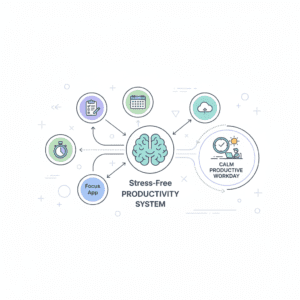
It doesn’t have to be confusing when you use several tools together. Integrate the two, and they become an exquisitely integrated productivity system.
Example of a Simple Productivity Workflow
Here is one of the best productivity workflow examples you can observe in practice by professionals:
- Schedule tasks with free task management tools like Todoist or Microsoft To Do
- Use Google Calendar to schedule your time with the time blocking technique
- Keep up with work hours on Clockify and achieve balance
- Files in Google Drive for quick access
- Focus with Freedom and block distractions
This approach clarifies and repeats in a peaceful way.
Workflow Automation Tools That Save Time and Mental Energy
Automation isn’t a luxury anymore. Rote processes can be eliminated — even by some of the more elementary workflow automation systems.
Simple Automation Examples
- Recurring weekly tasks for my auto review cycle
- ClickUp status updates on task completion
- Real time updates for the shared folders in Google Drive
These automations minimize decision fatigue, reinforcing user focus on high value work over mundane tasks.
How These Tools Support Work-Life Balance in 2026
And work-life balance is no longer about working less. It’s all about deliberately working. The perfect tools for work life balance enables users to:
- Establish work limits
- Build in breaks and focus time
- Limit task hopping Task hopping has a lot of reasons, but its typically your brain resisting long boring tasks in favor of sexy new ones.
Space in the mind creates itself when work is structured.
Expert Tips to Boost Focus and Efficiency
To really supercharge focus and productivity, professionals must combine tools with mindful practices:
- Go over your to-do list at the beginning and end of your day
- Apply prioritization tactics to get the most important stuff done
- Set parameters for notifications across collaboration tools
- Establish weekly planning routines
These behaviors turn productivity tools from digital lists into valuable scaffolding.
FAQs: Free Tools to Organize Your Work & Reduce Stress
Are free productivity tools enough for professionals?
Yes. Many free productivity apps now offer robust features that meet professional needs. When used consistently, they are often more effective than paid tools that go unused.
Which free tools are best for reducing workplace stress?
Tools that improve clarity—such as task managers, calendars, and distraction blockers—are most effective at reducing workplace stress. Visibility and planning matter more than advanced features.
How do I stay consistent with task management tools?
Consistency comes from simplicity. Choose one or two tools, build daily habits, and avoid constant tool switching. This is the foundation of learning how to stay organized at work.
Can productivity tools really reduce stress while working?
Yes. When tasks, time, and priorities are clear, people experience less anxiety. Well-designed systems help users reduce stress while working by eliminating uncertainty.
Why This Guide Recommends Tools Without Affiliate Bias
Many productivity articles are influenced by affiliate commissions. This guide is different.
- No paid placements
- No referral incentives
- Tools evaluated on usability and real-world value
Each recommendation is based on practical experience, public user feedback, and long-term relevance—not marketing incentives.
Final Thoughts: Staying Organized and Calm in 2026
Productivity in 2026 is not about doing more—it is about doing what matters with clarity and confidence. The right tools, combined with smart habits, make work feel manageable instead of overwhelming.