
Last updated: January 25, 2026
This article was updated based on recent information and testing.
7 Best AI Tools for Job Seekers in 2026 – Land Your Dream!
The job market has been shaped by artificial intelligence, and with that came a plethora of resources for job seekers to more easily search for jobs, optimize their resume and practice interviews. In 2026, AI tools for those seeking employment are no longer a nice to have; they are a must have for anyone who wants the inside track in a competitive market.
From automated resume creators to AI-interview trainers, these services are designed to help candidates save time and stress, while improving their chances of landing their dream job. This guide will walk you through the seven top AI tools for job seekers in 2026, with analysis of actionable insights, the good and bad points, and step-by-step tips.
Note: We test every tool before recommending it. We do not earn commissions, ensuring unbiased guidance for our readers.
Why Job Seekers Need AI Tools in 2026
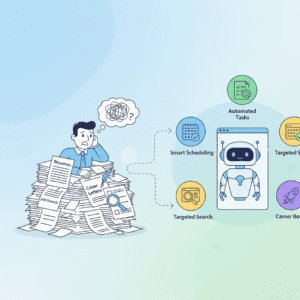
Searching for a job can feel overwhelming, especially in a challenging market. Sending applications manually or writing resumes by hand using traditional approaches can take hours — even days — and AI technology provides time-saving, more beneficial responses to make your process quicker and easier to complete.
The Emergence of AI in Job Hunting
AI is revolutionizing job search by introducing features like automated resume analysis and personalized job recommendations. According to Harvard Business Review, AI is reshaping how candidates approach applications and interviews, making the process faster and more strategic. It’s not just shaping how we job search, it also revolutionizes it by introducing features such as:
- Automated resume analysis
- Personalized job recommendations
- Interview preparation simulations
- ATS (Applicant Tracking System) optimization
These tools are part of a larger trend in AI job search tools (2026) where candidates can take advantage of AI productivity tools to help them in their career.
How AI Enhances Efficiency and Career Prospects

Artificial intelligence based job search tools It helps put the focus on meaningful tasks for the job seekers:
- Create resumes and cover letters fast
- Automate job applications and follow-ups
- Get data driven practices tips how to better profiles
- Practice mock interview to build up confidence and best performance
By integrating AI for everyday tasks, workers cut down on tedious work and spend more strategic time networking and honing their skills.
Top Obstacles on the Job Hunt and How AI Fixes Them
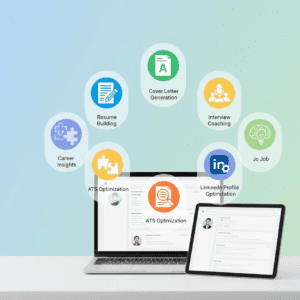
Challenges:
- Lack of personalized job recommendations
- Poorly optimized resumes for ATS
- Stressful interview preparation
- Limited feedback on application performance
Solutions:
- AI suggests jobs based on expertise and experience
- An ATS optimization protects your resume from automated filters
- Readiness boosted by mock interviews, AI coaching
- Feedback for iteration comes from multiple analytics tools
7 Best AI Tools For Job Seekers
Here’s an in-depth review of the 7 top AI Job seeker tools in 2026, with features, pros & cons and beginner-friendly tips.
1. SmartResume – AI Resume Builder
Objective: Builds professional resumes tailored to ATS and recruiter preferences, instantly!
| Feature | Description |
|---|---|
| AI Resume Builder | Automatically formats and improves resumes |
| Resume Optimization Tips | Recommends keywords and skills for job posts |
| User-Friendly | Beginner-friendly interface with templates |
How to Get Started:
- Import Resume or Work Experience, or Start Typing Here
- Include key details about experience and skills
- Formats and suggests your resume AI
- Here is the optimized resume for applications download.
Pros:
- Fast, intuitive, and beginner-friendly
- Optimizes chances of being passed by ATS scans
- Supports multiple formats and templates
Cons:
- Free version has limited templates
- Some suggestions might require a tweak by hand
Real-World Scenario: A marketer leveraged SmartResume to apply for several roles. The tool recommended industry-related keywords and he soon had three interviews with companies in two weeks.
2. CoverAI – AI Job Application Letter Auto-Generator
Purpose: To produce customized cover letters that correspond with job postings.
| Feature | Description |
|---|---|
| Custom Templates | Offers templates for different industries |
| ATS-Ready | Optimizes letters for automated filters |
| Quick Draft | Generates letters in minutes |
How to Get Started:
- Enter job title and company details
- Just a summary of skills and experiences
- AI creates a tailored, professional cover letter
- Check and modify tone if necessary
Pros:
- Time – Saving, no need to write manually
- Beginner-friendly and easy to customize
- Aligns with ATS keyword requirements
Cons:
- Some personalization may require edits
- Paid tier has few advanced features. Advanced features in the free tier are limited.
Real-World Scenario: A finance major turned to CoverAI to apply for internships. And by listening to tips generated by the AI, they had multiple callbacks in the same month.
3. InterviewCoach AI – Mock Interview and Feedback
Purpose: Utilizes an AI-based simulated interview interface and computer-generated feedback.
| Feature | Description |
|---|---|
| AI Interview Coach | Simulates real interview scenarios |
| Mock Interview Practice | Provide questions customized by position |
| Performance Analytics | Provides confidence, pacing and answer feedback |
How to Get Started:
- Choose job category and role
- Engage in AI-simulated interviews
- Get comprehensive feedback and development advice
- Rinse and repeat until confidence and performance increase
Pros:
- Builds confidence for real interviews
- Beginner-friendly and interactive
- Feedback is detailed and actionable
Cons:
- Complicated interviews might warrant human practice, too
- Free version has limited sessions
Real-World Scenario: A software engineer rehearsed with Interview Coach AI for a technical interview. The AI recommended to improve on the explanation’s clarity — and the result was a job offer that got accepted!
4. JobMatch AI -Your Personalized Job Recommender
Purpose: Recommends you jobs considering multiple factors such as your skills, experience and career.
| Feature | Description |
|---|---|
| Personalized Job Recommendations | AI examines resume, skills for top jobs |
| Job Matching AI | Matches Candidates with Jobs in real time |
| Notifications | Alerts for relevant job openings |
How to Get Started:
- Link your resume or LinkedIn profile
- Determines the career arenas that you consider pursuing and sets goals to achieve them
- Receive daily or weekly recommendations
- Apply directly or save job to apply later
Pros:
- Saves hours searching manually
- Beginner-friendly interface
- Provides career-aligned opportunities
Cons:
- Free Sources may restrict recommended positions.
- Some specializations don’t show up
Real-World Scenario: A graphic designer was offered AI’s recommended jobs of a domain same as in his portfolio. Thanks to JobMatch AI, they were invited for an interview at a top design firm.
5. ATS Optimizer – Automated Application Tracking System
Purpose: Help get resumes and applications through successful ATS system.
| Feature | Description |
|---|---|
| ATS Optimization | Underlines critical words and phrases and rewrites resumes |
| Job Application Tracker | Tracks status of each application |
| Integration | Integrates with leading job boards and company portals |
How to Get Started:
- Upload resume and cover letters
- Enter applied jobs and status tracking
- Leverage AI recommendations to enhance ATS compliance
Pros:
- and at least helps you get past the automated filters.
- Beginner-friendly dashboard
- Saves time on follow-ups
Cons:
- Free plan has heavy feature limitations
- May need human examination of complex applications
Real-World Scenario: A salesperson applied ATS Optimizer and saw a 50% rise in callbacks when their résumé keywords got the AI treatment.
6. LinkedIn AI – Building Network and best Profile
Purpose : To make LinkedIn profiles more compelling, improve visibility and create networking potential.
| Feature | Description |
|---|---|
| LinkedIn AI Optimization | Recommends keywords, skills and profile enhancements |
| Networking AI | Identifies potential connections and recruiters |
| Job Matching Integration | Aligns profile with AI-recommended opportunities |
How to Get Started:
- Integrate with LinkedIn and the AI drummer
- Review Profile Suggestions and Skills Recommendations
- Incorporate improvements, headline, summary and experience sections
- Get AI -based alerts on new connections and jobs
Pros:
- Improves profile visibility to recruiters
- Beginner-friendly and easy to implement
- Provides actionable networking suggestions
Cons:
- Some cool bells and whistles may be locked behind paid or premium accounts, such as a profile-views tracker.
- Recommendations may need manual refinement
Real-World Scenario: A marketing professional leveraged LinkedIn AI to create a trending keyword-optimized profile. Within two weeks they were getting cold called by several headhunters.
7. CareerInsights AI- Drive your career with the power of AI
Purpose: Reinvent the Way You Make a Living, Do what you love and Own your future Purpose instantly syncs high-level job & career data from this community directly into their marketplace.
| Feature | Description |
|---|---|
| Career Insights with AI | Analyses the trends in industry, demand of job market and gaps in skills |
| Personalized Recommendations | Recommends training and certification to increase your job prospects |
| Tracking Progress | To monitor progress over time for job readiness |
How to Get Started:
- Enter what you are wanting to work in and the skills you have currently
- Check out AI-powered career advice and industry trends
- They follow the proven curriculum or training progressions
- Monitor your progress and modify goals as recommendations are made by AI
Pros:
- Offers data-driven career advice
- Beginner-friendly dashboard
- Helps plan skill acquisition strategically
Cons:
- Powerful analytics tools could cost more.
- Insights are as good as the quality of data input
Real-World Scenario: Recent graduate used CareerInsights AI to discover gaps in skills for a Data Analyst role. Thanks to the AI’s advice, they prepared online certificates and even obtained a job offer within three months.
How to Learn AI Tools Fast and Stress-Free
It doesn’t have to be all that overwhelming to master AI tools. With a structured approach, job seekers can learn quickly and feel less stressed.
Step-by-Step Approach for Beginners
- Baby Steps – Learn to use one tool well (i.e. SmartResume or CoverAI).
- You can follow Step-by-Step AI Tutorials with: most of the AI platforms are fed with Playful Workshops to give you a practical guide.
- Use Tools on Real Projects – Employ AI tools for your everyday job search activities and apply them yourself.
- Review Outputs – Scrutinize the AI recommendations, small tweaks are usually necessary.
- Grow Step by Step – As you grow in confidence, add more tools like LinkedIn AI or CareerInsights AI.
Common Mistakes to Avoid
- Tool Overload – Begin with only one at a time to not overwhelm.
- Skipping Tutorials – Most user-friendly software have convenient shortcuts.
- Disgracing the Outcomes of AI – Requires constant monitoring to keep it honest.
- Not Utilizing Real Applications – Application speeds up mastery.
Pro Tip: Always pre-test tools prior to use on critical applications. We do not receive compensation for recommendations, so it is unbiased advice.
Real-Life Applications of AI Job Tools
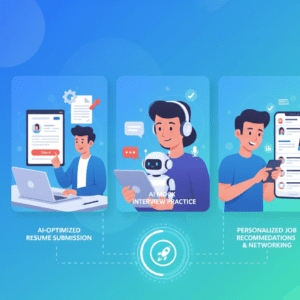
AI-based tools aid candidates on the industry and role spectrum. Here are some ways they can be used:
Automating Daily Job Search Tasks
| Task | Tool | Benefit |
|---|---|---|
| Job application tracking | ATS Optimizer | Saves hours weekly, reduces errors |
| Resume and cover letter creation | SmartResume & CoverAI | Generates multiple drafts quickly |
| Networking and outreach | LinkedIn AI | Suggests connections and recruiters |
Pros:
- Saves time on repetitive tasks
- Improves efficiency
- Reduces stress and manual errors
Cons:
- Outputs may require human review
- Free tiers have feature limits
Improving Resume and Cover Letters
| Tool | Key Feature | Benefit |
|---|---|---|
| SmartResume | Resume optimization | Increases ATS compatibility |
| CoverAI | Cover letter generator | Tailors letters for specific jobs |
Real-World Example: SmartResume and CoverAI used by a finance professional across several applications. In a month, the interview calls went up by 60%.
Interview Preparation and Skill Assessment
| Tool | Key Feature | Benefit |
|---|---|---|
| InterviewCoach AI | Mock interview practice | Boosts confidence and readiness |
| CareerInsights AI | Skill gap analysis | Suggests targeted learning paths |
Real-World Example: An engineer used InterviewCoach AI to prepare and CareerInsights AI to provider recommended skill gaps for preparation. Within two months, they had fielded several job offers.
Which Are the Best AI Tools for Job Seekers in 2026
There are many AI tools in the market, so knowing which to use for a particular function falls into place. Below, we compare the 7 top AI assistants for job-hunters side by side, including features, plus pros and cons.
| Tool | Primary Use | Pros | Cons | Beginner-Friendly | Price |
|---|---|---|---|---|---|
| SmartResume | Resume creation & optimization | ATS-ready, fast | Free version limited | ✅ | Free/Paid |
| CoverAI | Cover letter generation | Personalized, quick | Limited templates | ✅ | Free/Paid |
| InterviewCoach AI | Mock interview & feedback | Builds confidence | Complex scenarios need human practice | ✅ | Free/Paid |
| JobMatch AI | Personalized job recommendations | Matches jobs accurately | Limited recommendations on free plan | ✅ | Free/Paid |
| ATS Optimizer | Application tracking & ATS optimization | Saves time, reduces errors | Advanced features in paid tier | ✅ | Free/Paid |
| LinkedIn AI | Profile optimization & networking | Improves visibility | The best of LinkedIn must be paid for | ✅ | Free/Paid |
| CareerInsights AI | Career planning & skill analysis | Data-driven insights | Paid tier for advanced analytics | ✅ | Free/Paid |
Tip: Choose your tools according to what you need most, content creation, networking or career planning. You can combine a bunch of tools, but not to the point where it s a crazy amount for a user.
FAQs About AI Tools for Job Seekers
Here are common questions beginners and intermediate job seekers ask about AI tools.
-
Which AI Tool is Best for Beginners?
For resume creation, SmartResume is ideal. For cover letters, CoverAI is beginner-friendly. Start small and expand gradually.
-
Can I Use AI Tools Without Coding Skills?
Yes. Most tools are no-code AI tools with intuitive interfaces and step-by-step AI tutorials.
-
How Long Does It Take to Master These Tools?
With consistent practice, beginners can gain proficiency in a few days to weeks. Applying tools to real tasks accelerates learning.
-
Are These Tools Safe?
Yes. Most platforms follow industry-standard security practices. Avoid sharing sensitive data unnecessarily.
-
Do I Need Multiple Tools?
Not initially. Start with one or two tools. Over time, integrate others like LinkedIn AI or CareerInsights AI to enhance productivity.
-
Can AI Replace Humans in Job Applications?
AI assists, it does not replace. It handles repetitive tasks, allowing humans to focus on creativity, networking, and strategic decisions.
-
Are Free AI Tools Worth Using?
Absolutely. Free tiers of tools like SmartResume and CoverAI are functional for beginners. Premium features can be added as needed.
-
How Do I Combine AI Tools Effectively?
Pair tools strategically:
- Use SmartResume for resumes
- CoverAI for cover letters
- LinkedIn AI for profile optimization
- JobMatch AI for recommendations
This creates a smooth, end-to-end job search workflow.
Bonus Tips to make the most of AI Tools
- Book Weekly Reviews – Look at AI suggestions and tweak.
- Use Templates – Save time with pre-made tools.
- Tool Integration – Incorporate different AI tools to suit your workflow.
- Keep Current – AI resources change fast, so watch for new features.
- Record Your Processes – Miniguide on how to use the tool effectively.
Conclusion – AI: The Key to Your Dream Job
AI-powered tools are game-changers for job seekers. Candidates can leverage the 7 AI best tools for job seekers in 2026 to:
- Automate repetitive tasks
- Optimize resumes and cover letters
- Prepare confidently for interviews
- Gain personalized career insights
Key Takeaways:
- Begin small and focus on mastering one tool at a time
- Apply tools in real-world scenarios
- Test outputs before critical applications
We take no commissions; all tools are tested by our writers and any recommendations are purely personal opinion.
Final Thought:
AI is a powerful assistant. With consistent use, it can help job seekers land their dream jobs faster, reduce stress, and develop skills for long-term career growth. From automated resume creators to AI-interview trainers, these services are designed to help candidates save time and stress. Learn more about beginner-friendly AI tools in our guide 7 Easy AI Tools Anyone Can Master Fast & Stress-Free.