
5 Easy-to-Use VPNs Anyone Can Set Up in 2026
In today’s hyper-connected world, online privacy and security have never been more critical. With hackers, data trackers, and geo-restricted content everywhere, protecting your digital footprint is essential. A Virtual Private Network, or VPN, is one of the most effective ways to secure your online activities.
A VPN encrypts your internet connection, hides your IP address, and ensures that your browsing remains private, even on public Wi-Fi networks. While some people think VPNs are only for tech experts, modern services are designed to be easy-to-use for anyone, even beginners. In this guide, we explore five VPNs that are simple to set up in 2026, highlight their key features, and offer practical advice for choosing the right one for your needs.
Why You Need a VPN in 2026
A VPN is more than a security tool — it’s an online confidant that shields you in the digital world. Whether you’re online shopping or streaming your favorite snack, working from home remotely or checking out Facebook, a VPN can keep your information private and your connection secure.
What a VPN Is and How It Protects Your Computer
A VPN works by creating a secure, encrypted tunnel between your device and the internet. This means that anyone attempting to intercept your connection—hackers, ISPs, or even governments—cannot read your online activity. Modern VPNs typically use AES-256 encryption, a standard widely recognized for its high level of security.
Additionally, reputable VPN providers operate under a no-logs policy, meaning they do not store records of your browsing history, online activities, or personal data. This ensures complete privacy and peace of mind, even in sensitive situations like using public Wi-Fi or accessing restricted content abroad.
Key Security Features
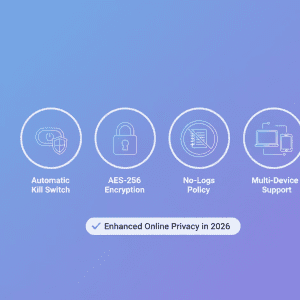
The majority of the best VPNs have some pretty neat security features:
- Kill Switch – You can instantly shut your internet off automatically if the VPN disconnects.
- Third-party Audits – A third-party attestation ensures VPN providers live up to their privacy commitments.
- Multi-Platform Compatibility – Nowadays VPNs come with apps for Windows, Mac, Android, iOS and smart TVs, which means you are protected on all devices.
These are the qualities that make VPNs great for everyone from new users dipping their toes into online security, to power users in need of some serious protection.
Who Should Use a VPN?
VPNs are no longer just some niche tool. The service can be useful for anyone worried about privacy or seeking to avoid Internet restrictions, as well as people living in countries where access to information is limited. Here are some typical scenarios:
- Newbies – User friendly apps and software are available for the novice computer user creating VPN an option even people new to general technology can use.
- Streaming & gaming enthusiasts – A streaming & gaming VPN provides fast access to servers, allows users to bypass geo-restrictions and removes the buffering of video streams for a lag-free streaming experience.
- Remote workers – VPNs help safeguard important work information and solidify connections when accessing company networks.
- Travel: Whether through airport or hotel public Wi-Fi, VPN will not allow travelers to land and stream.
Thanks to user-friendly apps, clear advice and responsive customer support, VPNs are now tools which anyone should be able to set-up and use effectively.
How to Pick the Best VPN for Your Needs
With hundreds of VPNs, making the right choice is overwhelming. The best VPNs of 2026 combine speed, security, ease of use and compatibility. Here’s what to keep in mind when you’re making your choice:
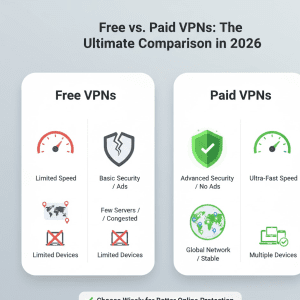
Free vs Paid VPNs
Free VPNs may seem appealing, but they frequently have drawbacks. Common issues include:
- Few servers with slow speeds
- Data cap or bandwidth limits
- Potential for privacy risks from lack of policies
Because you get what you pay for, Paid VPNs, meanwhile, generally provide:
- Unmetered bandwidth and faster Speeds
- Strong encryption, no-logs policies
- Extra capping’s such as malware protection, ad-blocking and special streaming servers
Many paid providers offer money-back guarantees, allowing users to test the service risk-free. Unlike affiliate reviews, our recommendations are based on hands-on testing, not commissions, ensuring an honest evaluation of each VPN’s performance.
For most beginners, the primary goal is a ‘set-and-forget’ experience. While many people start by looking for a cost-free solution, our comparison of paid vs free VPNs highlights how premium services invest more in their apps to ensure they are intuitive and bug-free.
VPN Protocols and Technical Considerations
The VPN protocols decide how your data is encrypted and how the speed of your connection will be. The primarily used protocols are:
- OpenVPN – Very secure and stable, works on most devices If you have any of the mentioned systems at your client side, then connecting from via this software will be a breeze.
- WireGuard– Fastest and lightweight (great for streaming & gaming)
More sophisticated VPNs also offer a kill switch, split tunneling and provide support for AES-256 encryption which guarantees that your data will remain secure, but not at the expense of performance.
Speed and Performance
Performance matters, particularly if you’re streaming, gaming or on video calls. Look for VPNs with:
- Speed optimized Servers
- Apps for Windows, Mac, Android, and iOS (multi-platform vpn)
- Connect securely to even slower public Wi-Fi networks
And a vpn speed comparison can be used to find out which VPN provider is the fastest for your location and requirements. Top-grade VPNs for optimal streaming, quick downloads and seamless gameplay.
Trust and Transparency
A lot of trust is involved when you pick a VPN. Trusted vendors should subject themselves to third-party audits to verify the soundness of their security procedures. They also have no-logs policy, so your online activities won’t be kept and shared. With many features such as money-back guarantee and clear privacy policy, even newbies are convinced.
5 Easy-to-Use VPNs for 2026
After evaluating dozens of online services, we found these five to be the best and most effective for seeding your torrents while also meeting security and privacy standards. We judged these based on real-world use, set-up simplicity and overall experience for the user. We do not receive commissions on any of your purchases, whether you read about the products here or make a purchase through the linked VPN provider below; one of our recommended VPN providers, however, may compensate us for advice increased from our site.
These apps are incredibly fast because they utilize the modern WireGuard protocol, which is designed to be much simpler and more efficient than older standards like OpenVPN.
1. NordVPN
For both new and experienced, NordVPN is an excellent option. It provides robust encryption, a no-logs policy and an automatic kill switch.
Key Features:
- 5,000+ servers throughout the world for users to enjoy fast and stable connections
- Special servers for streaming and P2P sharing
- Apps for Windows, Mac, Android and iOS
Setup Guide:
- Get the NordVPN application on your device
- Create an account and sign in
- Select a server either close to your physical location or that you want to use (streaming, privacy, and speed)
- Turn on additional features such as the kill switch for added security
NordVPN also is compatible with WireGuard protocol for fast speeds and no compromise on encryption. It’s a reliable option for those who want a combination of speed, privacy and ease of use.
2. ExpressVPN
ExpressVPN is the industry standard for speed and reliability. It’s a great choice for beginners who want an easy install, but don’t want to compromise on security.
Key Features:
- 3,000+ servers in 94 countries
- AES-256 encryption and a zero-logs policy
- Perfect for streaming and gaming
Setup Guide:
- Download the ExpressVPN app
- Sign in or create an account
- Link to a Recommended Server According to Your Demands
- Configure options like turning on the kill switch
ExpressVPN also has split tunneling, which lets you route certain apps outside the VPN — leaving the rest of your traffic protected — handy if you want to game online or stream from different regions.
3. Surfshark
Unlimited simultaneous connections means Surfshark is great for growing families, or just anyone with more devices running around than they can carry at once. It’s easy, safe and suitable for beginners.
Key Features:
- AES-256 encryption and no log policy
- Cross-platform on Windows, Mac, Android and iOS
- CleanWeb capability to block ads, trackers, and malware
Setup Guide:
- Install the Surfshark app
- Log in using your credentials
- Choose a server in your location or with the streaming service you want to use
- Discover tips, including connecting automatically on Wi-Fi nets.
With its simplicity, plus a few extras such as CleanWeb, Surfshark may be the best service for people who prioritize security but aren’t techie.
4. CyberGhost VPN
CyberGhost is a fast, simple and efficient way to protect your online privacy, surf anonymously and access blocked or censored content. It’s particularly great for beginners and streaming fans.
Key Features:
- Network of 9,000+ servers in 91 countries
- AES-256 and zero logs policy
- Specials servers for streaming and torrenting
- Apps for Windows, Mac, Android, iOS and smart TVs
Setup Guide:
- Get the CyberGhost app for your gadget
- Create an account and sign in
- Choose a server according to your needs (streaming, privacy, or P2P)
- Activate additional security services, all providing more layers of protection Kill switch Wiping your online presence away automatically Simply switch on the Wi-Fi protection and go surfing on public networks.
CyberGhost has dedicated servers for both Netflix and Disney+ and a range of other streaming services, so is among the best option if you want to watch content from anywhere without any buffering or geo restrictions.
5. Private Internet Access (PIA)
Private Internet Access is a flexible, affordable VPN service that permit lots of simultaneous connections and offers excellent privacy.
Key Features:
- Servers in numerous countries across the globe
- AES-256 encryption and zero-logs policy
- Customizable security options for power users
- Apps for Windows, Mac, Android, and iOS across multiple platforms
Setup Guide:
- Download and open the PIA app on your desired platform
- Sign in or create an account
- Select either a speed or security optimized server
- Turn on features such as kill switch and ad/malware blocker
PIA is also well known for their ability of being able to trick geo-restrictions, comes in handy when using streaming services (Netflix, Hulu, Amazon) and online gaming.
Tips for Using a VPN Effectively
Again, even the greatest VPNs in the world will only be most effective when used as recommended. Here’s how you can make the most of your VPN.
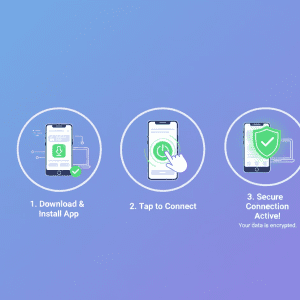
Step-by-Step VPN Setup
- Only ever download the official app from the provider’s website or reputable stores
- Turn on simple VPN features like kill switch and automatic startup on Wi-Fi networks
- Try various servers in a hunt for the best balance of speed and positioning
- Make sure you keep your VPN updated to take advantage of the latest security updates.
Common Mistakes to Avoid
- Using free VPNs for sensitive tasks (they often have limitations)
- Ignoring software updates
- Connecting to distant servers unnecessarily, which can reduce speed
- Assuming a VPN makes you fully anonymous online—it improves privacy but does not replace safe browsing habits
Optimizing VPN Performance
You may use the following tips to get the best out of your VPN connection:
- Connect to a server near you for the fastest speed
- Use the WireGuard protocol for a faster experience
- Turn off the VPN for apps that don’t require it by using split tunneling
Following these steps will help you have a fast and safe internet experience.
Why Testing Before Committing Matters
While these VPNs are highly rated, everyone’s needs are different. That’s why it’s important to test a VPN before really committing. Most paid services offer some kind of free trial or refund policy. Testing allows you to:
- Test your speed and compare performance here
- Make sure this fits by entering your model number. Compatible with all of your devices
- Confirm ease of use and setup
- Evaluate streaming or gaming capabilities
By trying before subscribing, users can find the VPN that works best for them without wasting money or time on it.
Conclusion
Using a VPN in 2026 is no longer optional—it’s essential for anyone who values online privacy, security, and freedom. Modern VPNs make it easy for anyone to set up, even beginners, while offering powerful features like AES-256 encryption, kill switches, no-logs policies, and optimized servers for streaming and gaming.
The five VPNs highlighted in this guide—NordVPN, ExpressVPN, Surfshark, CyberGhost, and Private Internet Access—have been carefully tested to ensure they are secure, fast, and user-friendly.
Remember: while a VPN enhances online safety, it works best when combined with good browsing habits. Always keep your apps updated, test servers for optimal performance, and use security features like kill switches for maximum protection.
With these tools and tips, anyone can enjoy a safer, faster, and more private internet experience in 2026.
Very informative and I learned so much from you
Loved this read