
Last updated: January 26, 2026
This article was updated based on recent information and testing.
Google Indexed Only One Page – Why?
Confusion and disappointment are the typical reaction of website owners when they check their internet properties and find that only one of their pages was indexed by Google. A site may have dozens or even hundreds of pages, yet Google Search Console reports the entire site crawls as being indexed at only one URL (typically a homepage). This is actually quite common and does not necessarily represent a penalty or major mistake.
This article explains why pages are not indexed by Google, what causes limited Google indexing, and how site owners can fix the issue using proven SEO practices. This happened on TheStackManual and here’s what we learned, and the insights apply to blogs, business websites, and large content platforms alike. Our team at TheStackManual has extensive experience in technical SEO and indexing issues.
What Does it Mean If Only One Page Is Indexed in Google?
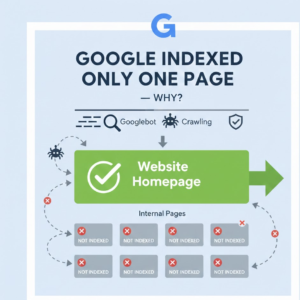
When Google indexes a page, that means the page has been found, analyzed and included in Google’s database. If only a single page is indexed, the other pages are either not being “seen” by Google or else it simply hasn’t yet decided to index them. That doesn’t necessarily indicate that something is “wrong”, but it does indicate that Google is feeling a lack of confidence in the site or else some really mixed signals.
Indexing vs Ranking – Clearing the common confusion!
One of the most confused terms in SEO is indexing and ranking. Indexing signifies Google actually has knowledge about the page. Ranking refers to the way that Google determines where (or whether) that particular page shows up in a search result. When a page is indexed and still does not rank. Similarly, if pages are not indexed they simply cannot rank. So for example with only 1 page indexed by Google, the problem happens prior to ranking.
Google’s official documentation on how indexing and ranking works explains the difference clearly.
Why Google Only Indexed the Homepage
For many, Google indexed only the homepage since:
- Other pages that may not be readily apparent to users
- Internal linking is weak
- The ‘technical’ SEO signals are blocking their way
- Content quality is inconsistent
This is particularly represented in new sites, badly-structured blogs, or websites developed without considering SEO recommendations.
Common Causes of Limited Google Indexing
Knowing your website is being crawled and not Google indexed is the first step towards finding a solution. Such causes typically can be grouped under technical, structural or content-induced failure.
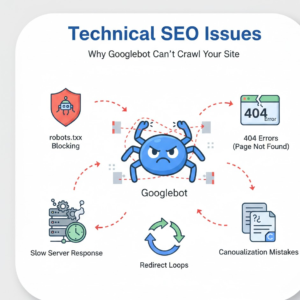
Technical Reasons for Indexing Issues
Many indexing problems originate from technical SEO misconfigurations that prevent Googlebot from crawling pages efficiently. Learn more about technical SEO and indexing best practices on Moz.
Crawl Errors and Indexing Problems
Crawl errors and indexation challenges when a page is blocked or cannot be decoded by Googlebot. These errors may include:
- Server timeouts
- Redirect loops
- DNS failures
When crawl errors are still present, it’s likely that Google will slow down crawling and index a single page which it knows for sure is accessible.
HTTP Status Codes and SEO Impact
Incorrect HTTP status codes and SEO issues can also limit indexing:
- 404 and 410 on pages
- Pages unintentionally serving 302 redirects
- Server Outputs That Should Not Have 200 Statuses For Page Failure
Correct status codes are crucial for search engines to understand which page they shall index.
Slow Crawl Rate and Crawl Budget Limitations
Crawl budget restrictions may affect your big or unoptimized websites. If Google identifies poor performance or too many low-value pages it can slow down crawling. A low crawl rate can lead the homepage to be indexed, but not any deeper URLs.
Robots.txt and Noindex Blocking
One of the most common—and overlooked—reasons for indexing problems is accidental blocking.
Robots.txt and noindex blocking can prevent Google from accessing pages entirely.
Robots Meta Tag Settings Explained
Improper robots meta tag settings such as noindex or nofollow can silently stop pages from appearing in search results. These tags are often added during development and forgotten after launch.
Even one misplaced noindex directive can result in most pages being excluded from Google’s index.
Sitemap and Internal Linking Issues
The structure of a website is crucial in determining whether it will be able to surface in search.
Sitemap Submission Benefits
An XML sitemap helps Google discover pages faster. It is not necessary but the advantages of submitting sitemap are:
- Faster discovery of new pages
- Clear signals about site structure
- Improved crawl efficiency
But, just submitting the sitemap is not enough to get indexed if there are other problems.
Internal links structure and orphans pages
A lack of strong internal links will always get you some orphans and discovery issues. Orphan pages are URLs no other page on the site links to. If there are no internal links for Google to navigate to the page, it might not EVER get indexed – particularly on newer sites.
Canonical Tag & Duplicate Content Implications
Search engines can be confused with incorrect canonicalization.
Canonical Pointing to Homepage Mistake
A common mistake is pointing canonical to the home page from multiple pages. When this occurs, Google will believe all your pages are copies and it will select the home page as the authority version. So only one of them is indexed.
Duplicate or Near-Duplicate Content Risks
Google may not index some or all versions of a page if they can be considered duplicate or near duplicate content. This includes:
- Auto-generated pages
- Tag or put pages with little variation in a “zombie” zone
- Copied or lightly rewritten content
Google wants unique, meaningful pages that have an obvious purpose.
Site Quality and Issues with Thin Content
Quality of content is very much part of indexing decisions.
Thin Content Penalty and Low Quality Indexing
Thin content penalty, though not always an official penalty, the effects of thin content penalty include pages with no value to offer. Aggregates pages with not enough specific content. This content was discovered during indexing.
Quality Content and Indexing Signals
There are few strong quality content and indexing signs including:
- Original insights
- Clear topical focus
- Helpful formatting and structure
These days, Google values usefulness more than ever in its results.
Mobile-First Indexing Impact
With the effects of mobile-first indexing, Google now basically considers a site’s mobile edition. Incomplete, broken and blocked mobile pages if the mobile web includes too many incomplete, broken, or blocked pages then indexing is difficult. If the desktop one is fine but there are some problems with the mobile version, you can find a lot of sites which have unexpected index drops.
New Sites vs Established Sites
Even if a site publishes high-quality content, being new can affect how quickly Google indexes pages. Google evaluates authority, history, and reliability. Established sites with many backlinks and traffic in the same niche often get priority. As a result, a new blog — even with excellent articles — may experience delays in indexing or may have fewer pages indexed initially. Over time, as the site gains trust, more pages are typically discovered and indexed.
Transparency & Editorial Integrity
Before continuing, it’s important to clarify something for readers and advertisers alike.
This article is written for educational purposes only.
No commissions are earned from tools, platforms, or services mentioned.
Every recommendation is based on testing, analysis, and real-world SEO experience—not affiliate incentives.
At TheStackManual, issues are analyzed first, lessons are documented, and solutions are shared only after validation. That approach ensures credibility, long-term SEO value, and compliance with AdSense policies.
How to Check Indexing in Google Search Console
When Google indexed only one page, assumptions should never replace data. The most reliable way to understand what Google sees is through Google Search Console.
This free tool provides direct insight into crawling, indexing, and coverage issues that affect website visibility.
Using Google Search Console URL Inspection Tool
The URL Inspection tool in Google Search Console lets site owners see a specific page on their site as how Google sees it indexing-wise. If you put in the URL, Google shows:
- Whether the page is indexed
- Eligibility for inclusion in indexing
- All crawl errors and indexing problems identified
The tool also displays the latest crawl date, canonical URL chosen by Google and mobile accessibility status. When a page is marked as “Discovered but not indexed,” the issue typically relates to crawl budget or content quality.
Identifying Pages Not Indexed by Google
The Indexing → Pages report uncovers pages that have not been indexed by Google, and classifies the reasons for exclusion. Common statuses include:
- Crawled – currently not indexed
- Duplicate without user-selected canonical
- Blocked by robots.txt
- Excluded by noindex tag
Each of these categories suggests a particular fix rather than a problem generally speaking.
Steps to Increase Pages Indexed by Google
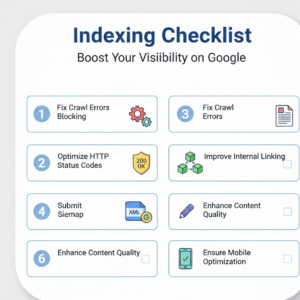
When we encounter problems, the emphasis should be on solutions. These are ways that force horrific amount of indexed pages by Google, and it is long-term solution rather short trick.
Fix Crawl Error and Increase Crawlability of the Website
Getting Started Improving Your Troubled Crawl Errors and Indexing While the fixes for that first item in my list above (crawling your website) can be difficult, most of them are within your control.
- Making sure pages respond with right HTTP status codes
- Eliminating redirect chains
- Improving server response times
Dealing with HTTP status codes and SEO issues helps Google trust the site’s infrastructure.
Maximize Sitemap and Internal Link Architecture
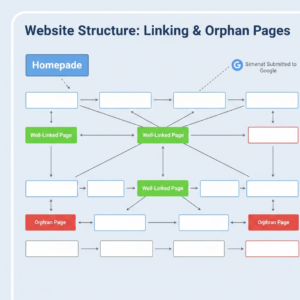
Improving sitemap submission benefits involves:
- Submitting only indexable URLs
- Removing blocked or duplicate pages
- Automated sitemap update when new content is published
Clean sitemap: But is best used in combination with a solid internal link architecture, which allows Googlebot to quickly find the most important page. Orphaned pages can generally be indexed quickly after internal links are added.
Improve Content Depth and Uniqueness
Quality content and indexing signals is more than just word count. Pages should:
- Fully answer search intent
- Avoid duplicate or near-duplicate content
- Provide original explanations or insights
Indexing without manual submission mostly occurs when weak pages are made stronger.
Common Indexing Mistakes to Avoid
A lot of sites have indexing issues not due to complexity like that, but because of avoidable mistakes.
Blocking Pages with Robots Meta Tags
Incorrect robots meta tag settings frequently cause indexing confusion. Pages may appear accessible, yet still carry noindex directives.
These tags should be audited carefully, especially on templates and CMS-generated pages.
Incorrect Canonical and Noindex Usage
Misusing canonical tags is another frequent issue. When multiple pages include a canonical pointing to homepage, Google consolidates signals and indexes only that main URL. Similarly, mixing canonical and noindex signals sends conflicting instructions that delay or prevent indexing.
Troubleshooting Site Index Problems Like a Pro
Advanced troubleshooting focuses on patterns rather than individual pages.
Diagnosing Crawl Budget and Server Issues
Persistent indexing problems may indicate crawl budget limitations combined with server inefficiencies.
Symptoms include:
- Repeated crawling of the same URLs
- Ignored deep pages
- Long gaps between crawl attempts
A consistently slow crawl rate often suggests that Google is prioritizing stability over exploration.
Monitoring Index Coverage Reports
Regular review of coverage data using Google Search Console URL Inspection helps detect early warning signs. Sudden increases in excluded pages or crawl anomalies should be investigated immediately to prevent widespread deindexing.
Editorial Transparency and Testing Philosophy
Every recommendation in this guide follows a clear principle:
Test first, suggest second.
No tools, platforms, or services mentioned here generate commissions.
Solutions are based on controlled testing, long-term monitoring, and real indexing behavior.
FAQs – Google Indexed Only One Page
Many website owners have similar questions when they discover that Google indexed only one page. Here are the most common queries, along with professional insights.
Why Your Pages Are Crawled But Not Indexed?
In some cases, Googlebot can crawl pages but cannot index them. Common reasons include:
- Thin content or low-value pages
- Duplicate or near-duplicate content
- Conflicting robots meta tag settings
- Canonical pointing elsewhere
Crawl does not equal indexing. Pages have to provide unique value and adhere to Google guidelines in order to appear in search results.
Does Indexing Mean My Page Will Rank?
Many beginners confuse indexing with ranking. While a page must be indexed to appear in search results, being indexed alone does not guarantee ranking.
Factors like content quality, backlinks, and user experience influence ranking. Even after Google indexed only one page, ranking potential exists once the site structure and content quality are improved.
How Long Does It Take for Google to Index a New Page?
The indexing time will be based on:
- Site authority
- Crawl budget
- Internal linking
- Content quality
New or low-authority sites may experience a slow crawl rate, sometimes taking weeks. Large, authoritative sites often see indexing within hours or days, especially when a sitemap is submitted and internal linking is strong.
How to Make Google Index More Pages?
Key steps include:
- Address technical problems such as HTTP status codes and SEO issues.
- Maximize internal structure that does not have a single orphaned page.
- Send new versions of your sitemap into Google to show them you have new content regularly.
- Enhance depth, uniqueness and quality of content.
- Canonical and noindex tags should not conflict.
Advanced Tips and Strategies for Consistent Indexing
Consistency is crucial. Implementing a system ensures Google indexes more pages without repeated manual intervention.
Audit and Optimize Crawl Budget
Check crawl regularly and apply technical seo elements:
- Remove unnecessary redirects
- Fix server response delays
- Reduce low-value pages
Resolving crawl budget restrictions will help Googlebot get to your key pages more effectively.
Strengthen Internal Linking
Internal linking helps Google find new pages. Orphan pages and discovery issues can also be avoided by cross-linking new content to older existing pages in a strategically way.
Enhance Content Quality
Target for producing pages of value:
- Original insights
- Proper formatting
- Visual aids and media
Great content pass along positive quality and index indication to Google, so more pages from the page domain become visible search results.
Mobile Optimization Matters
For positive mobile-first indexing influence, have a fully responsive and fast mobile version for Google to index your pages correctly. Crappy mobile pages can send your pages from desktop never to be indexed.
Maintain Transparency in Recommendations
At TheStackManual.com, all tools and methods are first tested rigorously.
No recommendations rely on commissions or affiliate incentives. Every suggestion is based on firsthand experience and measurable results.
“This happened on TheStackManual.com — here’s what we learned.”
Most indexing problems are fixable. Technical, structural, or content-related adjustments significantly improve indexing rates without shortcuts or risk.
For more step-by-step SEO and website optimization guides, check out our comprehensive How-to Guides category.
Final Takeaways
- Indexing vs ranking: Always remember that Google must first index pages before ranking is even considered.
- Check data first: Use Google Search Console URL Inspection and coverage reports before taking action.
- Resolve technical issues: Fix crawl errors, server delays, and misconfigured tags.
- Improve site structure: Submit a clean sitemap, optimize internal links, and avoid orphan pages.
- Quality content wins: Focus on originality, depth, and utility to ensure indexing.
- Monitor and iterate: SEO is ongoing. Regular audits, updates, and testing help maintain healthy indexing.
For personalized SEO advice, reach out via our contact page.
This is hands down the most thorough explanation I’ve found for the ‘single page’ indexing hurdle. Most guides just suggest waiting, but your deep dive into the technical reasons—especially the section on the difference between discovery and actual indexing—finally cleared up my confusion. Thank you for making such a complex SEO topic so easy to understand!
Excellent breakdown of the initial indexing phase for new sites. I really appreciated how you highlighted that Google often waits to build trust before crawling subpages. This post is a great reminder that patience and quality are just as important as technical setup. Looking forward to more deep dives like this!
Great breakdown of the issue and solutions. I appreciate how practical and easy to follow this guide is.