
9 WordPress Speed Hacks to Stop Losing Visitors
Making Your Site Faster, Friendlier, and More Engaging for Every Visitor
Introduction: Why WordPress Speed Optimization Matters
9 WordPress Speed Hacks To Keep Your Visitors From Leaving Split-second speed! That’s what we all love. Right? Eventually there is a point when we can’t compromise much more. How to Speed Up Your Site, Welcome All Visitors with a Hi and Make Them Want to Stay!
All website owners want visitors who linger, explore and convert — not bounce after a page takes too long to load. In today’s digital world, a slow site will not only frustrate users; it loses them too. This is where WordPress speed optimization becomes a necessity. Visitors are also more likely to engage, dig deeper and return if a site loads quickly — all of which contribute to your success online.
Fast websites also get rewarded by search engines. When metrics such as Core Web Vitals are part of ranking factors, ramping up your website speed is less of a choice and more of an SEO necessity. Core Web Vitals (and Largest Contentful Paint (LCP), First Input Delay (FID) and Cumulative Layout Shift (CLS)) represent performance metrics that show you how fast and how stable your site feels to actual users. Speed affects your rankings, user experience, and ultimately how much money you’ll make in those search results.
This first part of the article will concentrate on why website speed is important, the impact slow load times can have for visitors and how essential it is to have performance metrics like PageSpeed Insights score and host speed.
Why WordPress Speed Optimization Should Be a Priority
Fast websites also tend to increase user satisfaction and lower bounce rates — that’s the percentage of users who leave without doing anything interesting. A quick load time gives pages a responsive feel, keeps users engaged and retains them from bouncing to another site.
Speed is important for two reasons:
- User Experience and Engagement: Faster-loading sites get more engagement. They’re slow to load, so users are too impatient and tend to bounce. This affects your bounce rate – the rate at which people leave your site without taking further action but before you’ve solved their problem.
- Search Engine Rank: Google and most other search engine’s ranking algorithms are heavily based on load times.
Instruments similar to the PageSpeed Insights score are also extremely helpful in guiding site owners about how their website is performing and what are it’s weak spots. Serving hosting and optimized content is the basis for both of these. Picking the right host and focusing on load speed from the outset can snowball into increased overall website performance.
Shared vs Cloud Hosting: choosing the right hosting is also a factor
Key Performance Metrics Every WordPress Site Should Track
Before getting into the nitty gritty hacks, it’s important that you understand performance metrics — particularly Core Web Vitals and their ilk.
Understanding Core Web Vitals

Core Web Vitals are the set of fundamental user-centred performance metrics that contribute to a quality user experience and have been broken down over time. These include:
- LCP (Largest Contentful Paint): Quantifies the time it takes for the largest visible item, such as a hero image or header, to load on a page.
- FID (First Input Delay): Measures the response time of your site when a user first interacts with it.
- CLS (Cumulative Layout Shift): Measures how much the visual layout of a page changes during its loading phase.
Together, these are metrics that provide a snapshot of whether a site feels slow or snappy to visitors. Further, increasing performance here not only increases the PageSpeed Insights score — but it directly affects user satisfaction and retention.
1. Optimize Images and Media (A Big Boost for Load Time)
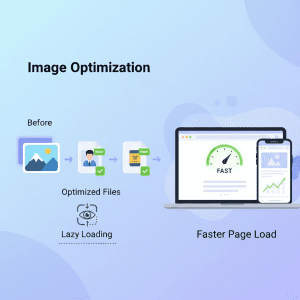
Often images are the largest files on a web page. If not addressed properly, they can really slow your load times down.
Why Image Optimization Is Essential
Big, uncompressed images make browsers and servers work harder — leading to slower load times (particularly on mobile). Optimizing images includes:
- Compressing images without losing quality
- That, and serving images in WebP as modern as formats.
- Reducing file size before uploading
When you reduce the media that visitors have to load when they visit your site, it takes less bandwidth and allows pages to display faster — which is a surefire way to keep visitor’s clicking.
Lazy Loading: Only Load What’s Needed
So while lazy loading images means that images (and videos) are only loaded by a visitor when they scroll to them. This method reduces browser work on initial load. The vast majority of WordPress themes and performance plugins actually support lazy loading, so implementation can be easy and bring rewards.
2. Implement Effective Caching Strategies
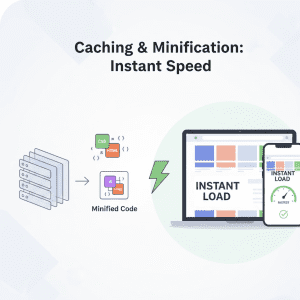
Caching is one of the major way to increase site speed in WordPress.
What Caching Does for Load Time
Caching saves your website’s pages in static form, and serves it to visitors so they don’t have to generate the page dynamically every time. This cuts down on server strain (thus loading times) – particularly for returning visitors.
There are multiple caching approaches:
- Browser caching
- Static page caching
- Object caching
Each improves the amount of time it takes a visitor’s browser to load your content.
Choosing the Right Caching Plugins
On top of that, plugins such as LightSpeed Cache and WP Rocket can totally turbocharge the site. These implements frequently offer caching in conjunction with other rich features, such as minifying or lazy loading.
3. Minify CSS, JavaScript, and HTML
What Minification Does
When working with code (CSS/JS/HTML) there are always additional spaces, comments and unused code in our files. Minification removes these excess factors to reduce file-size, which in turn improves how quickly your site can deliver code to a browser.
Combining and Deferring Scripts
In addition to minification, bundling files and deferring nonessential JavaScript can reduce load times more so that critical components appear in the browser sooner.
4. Choose a Fast Hosting Provider
The speed with which your server responds can noticeably impact the experience of every visitor. Good hosting also minimizes server response time and delivers content faster. Slow servers can counteract any other optimizations you implement.
Here is how a quicker host can help:
- Reduced initial load times
- Better handling of traffic spikes
- Improved performance metrics like LCP
Selecting the right provider is a base switch because all of your other tricks are built upon it.
5. Use a Content Delivery Network (CDN)
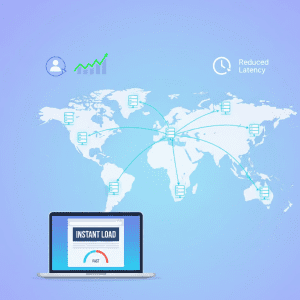
I have to show you one last trick for speeding up WordPress – both the back-end and front-end. CDN takes the static files (like CSS, JS and images) on your site and lets visitors download them as fast as possible by serving the files on servers as close to them as possible. For example, when a user accesses your page a CDN will load the content from its closest server thus lowering latency and delivering faster no matter where in the world these individuals are. This is especially important on sites with worldwide visitors. Configuring a CDN: A must to prevent global load times which will affect performance.
6. Optimize Your Database for Faster Load Times
Like with any site, the WordPress database grows as your site does — and sometimes it collects gunk like old drafts, transients, spam comments and more that simply need to go. Decluttering and optimizing your database:
- Removes clutter
- Streamlines queries
- Reduces server load
The consequence is faster page delivery and a stronger backend site.
7. Reduce HTTP Requests
All resources on a page, such as images and CSS or JavaScript and even fonts require an HTTP request. The more requests, the longer a site will take to load.
Combining Files and Reducing Plugins
The less plugins activated and the code files that is being merged = There is no heavy requests. This is an optimization that saves on load time and does not lose any critical calls you will need.
8. Choose a Lightweight WordPress Theme
Themes can accompany any or all of code, styles and scripts — some more than others. It’s also worth mentioning that heavily designed themes with many built-in features have a tendency to bring some extra weight, and as a result they can cause your pages to load slower. Choosing a lightweight WordPress theme, which is also optimized for speed and high performance makes it easier to load your pages faster and will improve your visitor’s experience from the get-go.
9. Consider AMP for Mobile Experiences
While not always necessary for every site, Accelerated Mobile Pages (AMP) can deliver super‑fast mobile experiences by serving streamlined versions of your content. This can be especially helpful if a significant portion of your visitors come via smartphones.
Conclusion: Bring It All Together for Consistent Results
Optimizing WordPress isn’t a one trick pony, but more systematized approach to cutting down load times and keeping visitors glued to what they’re seeing. Every optimization step — whether it’s optimizing images, using caching or picking the best host ensures they have a faster and more resilient site. Testing your site regularly with tools like PageSpeed Insights and monitoring Core Web Vitals can help you track progress and determine where improvements are needed most.
Practical Implementation of WordPress Speed Hacks
Now that we know the “what” and “why”, let’s shift our focus on the how. There are tons of tweaks for speed like these that can have a real impact on both user-experience and search engine performance.
1. Optimizing Images and Media – Step by Step
Compress Images Before Uploading
High-resolution images don’t need to be big files, either. Tools like TinyPNG or ShortPixel can be utilized to compress an image file with absolutely no quality loss. Doing this will help make the pages load quicker for your visitors.
Implement Lazy Loading for Media
Lazy loading does not load all the images at once, It loads only those that it is shown. Lazy Loading WordPress 5.5+ ships with built-in lazy loading, however plugins such as Smush can offer additional options. This is how you can maintain high PageSpeed Insights scores and ensure your Core Web Vitals — Especially LCP — are in excellent condition.
Use Modern Formats Like WebP
WebP images are lighter than JPEG or PNG but just as high quality. If doing so works out, then converting your media library to WebP might knock seconds off your site’s load time — particularly for mobile users. Tip: Don’t forget to check your images after converting it. We don’t, however, make a habit of blindly recommending tools, which is why we test them out to respect the other products listed above.
2. Caching – Make It Work for You
Understanding Browser and Server Caching
Browser and Server Caching in Action Browser caching is when your site’s files such as CSS, JavaScript, and images are stored on a visitor’s device. Server Caching Server caching is serving pages pre-generated, the server processing overhead being avoided. Together, they go a long way toward reducing load times.
Recommended Caching Plugins
Popular plugins like LiteSpeed Cache, WP Rocket, and W3 Total Cache combine multiple optimizations, including minification, lazy loading, and database cleanup. While some tools are free, we test them personally before recommending them — no commissions or affiliate biases here.
3. Minifying CSS, JavaScript, and HTML
Step-by-Step Minification
Minification is a process to remove surplus spaces, comments and characters from the code. Some caching plugins manage that on their own. For manual control:
- Merge several CSS/JS files into one.
- Defer offscreen images Consider lazy-loading offscreen and hidden images after all critical resources have finished loading to lower Time to Interactive.
- Use plugins which support automatic minification and updates can be completely hassle free.
Pros: Smaller file size means pages load faster, improving PageSpeed Insights and UX.
4. Choosing the Right Hosting Provider
Factors That Affect Speed
- Server response time
- Server location (the closer to the crew, the better)
- HTTP/2 or HTTP/3 support
Choosing a fast hosting is the most important optimization to make. We Test and Use those services before recommending them ensures things get done fast.
5. Content Delivery Network (CDN) – How to Set It Up
Benefits of a CDN
- Improves load time by pulling content from nearest server
- Handles global traffic spikes
- Performance enhancement for mobile and foreign users
Implementing a CDN in WordPress
You will need to start configuring the CDN. Some recommended CDN’s include Cloud flare, KeyCDN and StackPath. Integrating a CDN is typically as simple as installing a plugin or updating the DNS. Once again we never recommend any service unless we have tested it and verified that it does in fact deliver faster website speed.
6. Database Optimization – Keep Your Backend Clean
Step-by-Step Cleanup
- Get rid of old post drafts and revisions
- Delete spam and unapproved comments
- Reset everything and the temp data respectively
Plugins like WP-Optimize are able to take over the job. Index files, a cache mechanism for database minimizes onto stuck queries that being in server response time and load speed overall.
7. Reduce HTTP Requests
Combining and Streamlining Assets
- Combine all CSS and JS files
- Limit unnecessary plugins
- Good practice: Use little heterogeneous font styles
Tip: Fewer http requests means faster page load times. Don’t forget to test after you combine files or you could break your site.
8. Lightweight Themes – Why They Matter
Light Themes – A Matter of Weight A light WordPress theme will reduce the bloat, and remove any extraneous code. Many of the popular themes comes with functions that you may never need but they take resources to be active on your site. Focus on:
- Minimalist design
- Mobile-first responsive layouts
- Optimized code for performance
Why not couple all of this with a theme and efficient image compression to guarantee minimum speed and great user experience?
9. Accelerated Mobile Pages (AMP)
AMP serves a stripped-down version on your site to mobile visitors so it helps improve load times and Core Web Vitals on mobile. AMP is not mandatory for every site, but can offer substantial benefit to websites that rely heavily on engaging instruction.
Implementation Tips:
- It is recommended to use the official AMP plugins for WordPress
- Test functionality before going live
- Benchmark the performance impact using tools such as GTmetrix or WebPageTest
Tools to Monitor and Test Performance
- PageSpeed Insights – to test your page speed and Core Web Vitals
- GTmetrix Just like PageSpeed Insights, GTmetrix provides both your load time and optimization recommendations in detail.
- WebPageTest: Offers both global testing and waterfall charts.
Frequent testing will help maintain all optimizations while you continue to add content or plugins.
Practical Tips for Maintaining Speed Over Time
How can I stay fast (what’s some tips for long endurance)?
- Regularly audit plugins — delete or replace heavy ones
- Regularly optimize images before uploading
- Update WordPress, themes and plugins regularly
- Try out new features before taking them live
Note: We do not earn commissions for any tools mentioned. All recommendations are based on testing and real-world performance.
FAQs About WordPress Speed Optimization
By providing answers to popular questions, site owners can troubleshoot problems.
Why is WordPress Speed Important?
Fast sites enhance user experience, lower bounce rates and boost conversion optimization. Visitors who visit a faster site are likely to navigate more pages on the same session and come back. Fast sites are also rewarded by Google in search rankings, which makes speed an important factor for SEO.
How Do Caching Plugins Improve Speed?
Static page caching, browser cache and server cache help visitors access pages more quickly – popular assets are allocated a cached version. They make this all easier with various plugins such as LiteSpeed Cache and WP Rocket that manage both caching along with other optimizations such as lazy loading and minification. As a first step, you’d want to test each plugin to verify they work with your site before enabling the feature across the board.
Can Image Optimization Impact Rankings?
Absolutely. Compressing images, and using webp format and lazy load images can not only speed things up but also positively affect search rankings. Images that are loading faster could potentially help with CWV metrics including LCP as well as enhance visitors experience.
What Are Core Web Vitals?
LCP, FID and CLS reflect real user experience for the site speed and responsiveness. Optimizing these metrics will include optimizing images, caching, reducing http requests and having a well-optimized WordPress theme. Monitoring is important to keep these numbers in the best zone.
Which WordPress Speed Tools Should I Use in 2025?
- PageSpeed Insights – To test the speed of the site and figure out where it’s bottlenecks at
- GTmetrix – Get Insight into load times and recommendations for improving performance
- WebPageTest – Detailed global testing
All tools are tested for reliability; suggestions come merit, not kickbacks.
Troubleshooting Common Speed Issues
Some problem will still occur even after optimization. Here’s how to handle them:
Slow Server Response
- Verify that your hosting provider speed is fast & consistent hosting provider speed
- You might want to upgrade plans or swap over to a server that’s been configured specifically for WordPress.
Heavy Plugins
- Audit active plugins and deactivate superfluous ones (plugins audit)
- Consolidate scripts as much as possible to minimize HTTP requests
Mobile Load Times
- Use AMP for mobile to make it faster
- Optimized light themes of WordPress and light images for mobile screens.
Unexpected Layout Shifts
- Check for CLS issues
- Font, image and embed optimization (fine tune to eliminate scores for text created layout shifts)
Maintaining Long-Term Speed Performance
You need to maintain WordPress optimization regularly. Long-term strategies include:
- Run routine performance tests with PageSpeed Insights and GTmetrix
- Update your themes and plugins and take advantage of the performance upgrades
- Image and other embedded media optimization Optimize new content before it gets uploaded.
- Monitor Core Web Vitals consistently
- Database upkeep – Remove old data over time
Monetization Tips Without Compromising Speed
When you’re building AdSense and affiliate sites, speed is of the essence:
- Then you need to be strategic as to where your ads go so they don’t get in the reader’s way of the content.
- Utilize a-sync ad loading so you are never slowing down the page
- Test your ad placements with performance tools to minimize impact
- Don’t put too many bulky ad scripts together at the same time
Note: all plugins and tools recommended tested before suggestion. We don’t receive commissions for any recommendations — we simply want performance-driven advice.
Summary of 9 WordPress Speed Hacks
The Conclusion of the 9 WordPress Speeding Tweaks
- Optimize Images and Media – Compress, lazy load and WebP Images
- Utilize Caching Mechanisms – Site Browser, server browser and object caching
- Minify CSS/JS/HTML – Decrease page load time and defer scripts
- Pick a Quick Hosting Company – Low server response times A2Hosting is yet another fantastic internet hosting provider that has an ideal track history with page load instances.
- Use a CDN – Serve content from the nearest server
- [Optimise Database] – Clean old data and revision.
- Minimize HTTP Requests – Join files and don’t use too much plugin
- Use a lightweight WordPress theme – Less design, More code efficiency
- Think AMP for Mobile – Faster mobile experiences
With these simple steps, site owners can keep people on their site longer, enhance SEO and provide a better user experience—all while keeping AdSense-friendly, monetization-ready sites.
Final Thoughts
Optimizing WordPress speed is a balance between technical changes, strategy, and keeping an eye on things. Each hack complements the others. Faster websites result in:
- Happier visitors
- Higher engagement
- Better rankings
- Improved ad revenue potential
Always remember: test before implementing. What works for one site may not work for another. The tips here focus on real-world results — not affiliate incentives — so you can make informed choices for your WordPress site.