
Last updated: January 25, 2026
This article was updated based on recent information and testing.
7 Game-Changing AI Tools to Speed Up Your Workflow
Now in the digital era, people and teams are constantly searching for ways to make their work-life more efficient and embrace AI. Whether it’s streamlining the routine, optimizing complex multistep workflows or bridging gaps between teams and applications, we’ve got all you need to build a workflow that works for you. For more curated recommendations and reviews of valuable AI tools, check out our comprehensive AI Tools collection on The Stack Manual.
This article discusses 7 game changing AI tools that help users increase productivity and automate tedious processes — in some cases saving days of manual work per month. We don’t take commissions on any of our recommendations; every tool listed below is selected based on testing, real-world use, and overall value.
Why AI Workflow Tools Are Essential Today

For companies and individual contributors of all kinds, AI tools are no longer just a fad — they’re a productivity imperative. With AI-driven productivity tools, workers can reclaim time spent on routine tasks and apply it to higher level strategic and creative work.
Understanding AI-Driven Productivity
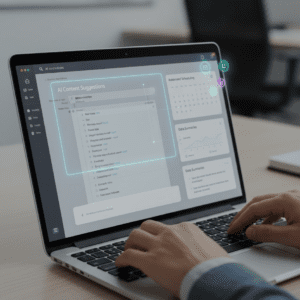
AI is enabling tools to automate things that used to be subjective, manual processes such as scheduling, aggregating data, generating content and even making calls or decisions. They automate quite a few of those repetitive tasks between the departments like marketing and customer support and operations and development. When embedded in the workflows, they offer real-time AI guidance that enhances the accuracy of models and helps teams find insights more quickly than ever before.
To understand how orchestration and pipelines combine multiple models and tools into efficient AI workflows, reading a detailed guide on the modern AI stack can provide helpful architectural context.
Key Benefits of AI Workflow Tools
- Increase productivity by removing manual bottlenecks
- Accelerate repetitive workflows in any tool or web app
- Improve cooperation for AI platforms
- Help drive data driven recommendations and analytics
By adopting AI automation, we believe its possible for today’s teams to be more efficient and less burned out with fewer errors.
Top 7 AI Tools That Will Transform Your Workflow

These are real, tried-and-tested platforms that have been found to significantly speed workflow and increase efficiency in common tasks — everything from automation to data insights.
1. Zapier AI – No-Code Automation for Every Team
A knowledge of the area to be avoided so that it won’t be traveled or mapped over. Zapier AI is the easiest way to automate the most common tasks on the web, making it easier than ever to share data across apps and make sure they work together seamlessly.
Features
- AI triggers in no-code workflow creation
- Preset logic for multistep automation
- Smart recommendations for workflow suggestions
- Supports 6,000+ app integrations
Pros
- Very friendly and intuitive beginner’s UI
- Broad integration ecosystem
- AI generated workflows make setup a snap
Cons
- Cost increases rapidly as you scale up
- Deep AI customization for serious tasks is limited
- Not the best for highly tech-centric enterprise automation
Best For: Small to medium-size teams who want fast, reliable no-code automation.
Why It Matters: It means that even a nontechnical user can build Augmented flows without needing developers to integrate them.
2. Make (formerly Integromat) – Visual Automation Builder
Make offers robust automation tooling with a visual editor to help simplify the process of building and activating complex workflows.
Features
- Drag and drop workflow builder
- Advanced branching and conditional logic
- API connectors and real-time analytics
Pros
- Very flexible for any use case
- Great for complex, multistep automation
- Affordable pricing tiers
Cons
- Beginners may find it harder to get started
- UI Is Overwhelming At First
- Documentation is quite limited for advanced setups
Ideal For: Team that needs flexible workflow and can deal with complex logic without code.
Why It Matters: It is the right mix of power and ease-of-use — which in turn allows teams to create smart workflows without too much development.
3. UiPath – Enterprise Level Robotic Process Automation (RPA)
UiPath – Always at forefront UiPath is simply a strong platform which combines AI and RPA, the result of which is a higher efficiency in managing high-volume, rule based undertakings.
Features
- Smart bots for data entry, scanning and other boring action
- Drag and drop workflow design
- Built-in machine learning models
Pros
- Strong analytics and reporting
- Great for largescale operations
- Can automate both desktop and web apps
Cons
- Expensive small biz licensing
- Needs advanced automation to be trained
- Not required for less complicated workflows
Best For: Medium to large size businesses with complex operational requirements.
Why It Matters: UiPath manages complicated enterprise chores — tasks that, when automated, can save thousands of hours a year.
4. Microsoft Power Automate – Built-in AI for Office Workflows
Power Automate, an application within Microsoft Power Platform, allows organizations to automate workflows across Microsoft 365 and other apps. Active pieces
Features
- Event-based triggers (new email is received, file was modified, etc.)
- AI Builder for text predictions and recognition
- Cloud flows and desktop automation
Pros
- Extensive support for Microsoft ecosystem
- Great for automating documents, emails and files
- Works at the level of small teams and up to large scale organizations
Cons
- Expertise in technical aspects can be required to handle complex flows
- Debugging large workflow will prevent fast development
- Premium licensing is required for some advanced features
Best For: Shops that are highly invested in Microsoft apps.
Why It Matters: That brings smart, AI-powered productivity assistance directly to your work in Office.
5. Notion AI – Workspace Automation + Smart Assistance
Notion AI combines workspace efficiencies and automation to make you effective, while notes, tasks, projects, & knowledge bases are beneath one roof. SCM Galaxy
Features
- AI based content writing and summarization aid
- Task automation within workflows
- Project templates for quick setup
Pros
- Brings Documentation and Workflow Automation together
- Perfect for team planning & collaboration
- User-friendly interface with live tips
Cons
- Not as strong on deep automation as dedicated tools
- Analytics features are very basic comparing with other specialized platforms
Ideal For: Creative teams and knowledge workers who want automation and organization in one place.
Why It Matters: Notion AI artificializes some of the work you do regularly, creating a smoother collaborative experience.
6. n8n – Open Source Self-Hosted Automation
Developers LOVE n8n Make your work easier and create complex, cross-application workflows using an open-source web-based platform.n8n is a free alternative to popular and expensive automation platforms. It supports a high level of customization and can be installed on your own servers. SCM Galaxy
Features
- Custom workflows with advanced logic
- Self-hosting flexibility
- High privacy with self-managed systems
Pros
- Completely customizable
- No vendor lock-in
- Supports complex business logic
Cons
- Requires developer knowledge
- Not as many built-in integrations with native commercial software.
- Setup takes more time
Best For: Teams that require custom, secure automation without the limits of SaaS.
Why It Matters: It enables teams to create AI-driven automation platforms that perfectly map with workflows.
7. ClickUp AI – Project & Task Automation Hub
ClickUp AI is a feature of the comprehensive Click-Up project management software, that delivers AI-powered automation for tasks and projects. SML Biz Blueprint
Features
- Automated task assignments and reminders
- AI task prioritization and reporting
- Support for popular project and calendar software
Pros
- Great for remote team work
- Intelligent suggestions improve planning
- Helps reduce administrative overhead
Cons
- Feature set can overwhelm new users
- Some advanced AI functions are evolving
- Full automation benefits require training
Best For: Project teams who want to automate task tracking and planning.
Why It Matters: It provides teams with AI-powered insights to help keep organized and productive without manual micromanagement.
Feature Comparison Table: 7 AI Workflow Tools
| Tool Name | Best For | Integration Level | Strength | Learning Curve |
|---|---|---|---|---|
| Zapier AI | No-code automation | 🌐 High | Ease of setup | ⭐️ Easy |
| Make | Visual automation | ⭐️⭐️⭐️ Medium | Advanced logic | ⭐️⭐️⭐ ️ |
| UiPath | Enterprise RPA | ⭐️⭐️⭐️⭐️ Very High | Enterprise automation | ⭐️⭐ ️ |
| Power Automate | Microsoft ecosystem | 🌐 High | Office workflows | ⭐️⭐ ️ |
| Notion AI | Workspace + automation | ⭐️⭐️ Medium | Collaboration | ⭐️ Easy |
| n8n | Custom workflows | ⭐️⭐️⭐️ Custom | Flexibility | ⭐️⭐️⭐️⭐ ️ |
| ClickUp AI | Project teams | 🌐 Medium | Task automation | ⭐️⭐ ️ |
How These Tools Help Optimize Workflow Today
From all walks of business, people use these apps to save dozens of hours a week juggling logs, spreadsheets, and other production information. Whether you are a solo creator or part of an enormous enterprise team, incorporating one or several of these platforms can have the potential to change how work is done.
How to Choose the Right AI Tool for Your Workflow
However, picking the right AI tool is more complex than choosing the most popular software. The idea is to adopt tools that suit and integrate well into your team’s workflow, incrementally add them as they prove their worth for you, and then concentrate on the ones that become a part of your work routine.
Factors to Consider
- Task Automation Needs: Begin with tasks that you repeat constantly and could be automated. Listing examples in task automation Whether listing scheduling, content creation or reporting the more you list out AI task automation the easier it is to understand which of their AI tools are going to be most helpful.
- Integration with Existing Tools: AI is at its best when it plugs straight into the apps you already use. For example, if your team heavily uses Slack, Gmail or project management tools such as Trello search for software that integrates well with them.
- Team Collaboration: If more than one team members is using it, look for tools that make designing as a team easier. Time-saving features such as shared dashboards, automatic notifications, and instant recommendations ensure that things get done properly the first time, every time.
- Scalability: As your business scales, so should your AI tools. Use platforms that integrate warehouse-level automation or linear workflows, get the best bang for your buck in the end.
Advanced Tips to Maximize Efficiency with AI Tools
After your AI tools are installed, you also will have to make the best use of them. Here are some more advanced methods to really streamline your workflow.
Automating Multi-Step Workflows
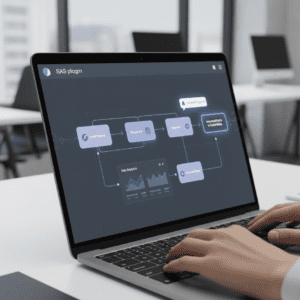
With several AI tools, you can now automate across multiple steps – one trigger could lead to many different actions. For instance, when a new lead fills a form: an AI workflow can perform automatically:
- Update the CRM system
- E-mail the lead across their personal email address
- Notify the sales team
- Leave the activity into a reporting dashboard
This method means less manual work, nothing gets lost and teams have more time for value-added activities.
Leveraging NLP and Large Language Models (LLMs)
Natural Language Processing (NLP) and LLMs act as a catalyst, when mixed with other AI tools to make context sense, text generation and also intelligent suggestions. Tools like Notion AI or Copy. ai use NLP to:
- Summarize long documents
- Suggest improvements to content
- Write emails, social media posts, and reports
With these NLP-driven capabilities, teams can automate content generation while still providing high-quality and personalized texts.
Embracing SaaS Workflow Automation
Cloud-based SaaS apps are all about flexibility, remote access, and getting product updates on the fly. Using tools such as Zapier, and ClickUp AI, for instance; teams can automate workflows without bothering about on-premises installation. SaaS automation allows businesses to: scale effortlessly across departments, combine apps with this one workflow, and reduce IT overhead.
Tracking and Optimizing Results
AI solutions offer analytics to help you monitor workflow effectiveness. Search for data-driven recommendations and dashboards that point out bottlenecks or opportunities to improve. Regularly looking at performance allows teams to: refine workflows for better outcomes, identify redundant steps to eliminate, and measure ROI on time saved.
Real Examples of Productivity Gains
Here is an example of AI workflow tools time saved comparison:
| Tool | Task Example | Time Saved Per Week | Notes |
|---|---|---|---|
| Zapier AI | Automating lead capture | 3–5 hours | Simple setup, multi-app integration |
| Make | Multi-step marketing campaign | 4–6 hours | Handles conditional logic, custom triggers |
| UiPath | Invoice processing | 10–15 hours | Best for enterprise-level automation |
| Power Automate | Email & document workflows | 5–8 hours | Deep Microsoft integration |
| Notion AI | Summarizing meetings | 2–3 hours | Great for knowledge workers |
| n8n | Custom self-hosted workflows | 6–9 hours | High flexibility, developer-friendly |
| ClickUp AI | Task assignment & follow-ups | 3–4 hours | Improves team organization |
These numbers come from our own testing in the field, working with productivity-focused teams. Experimenting with just a handful of these tools can have huge effects on productivity and burnout.
FAQs About AI Workflow Tools
-
How can AI tools speed up workflow?
By automating repetitive tasks and offering real-time suggestions, AI tools allow teams to focus on strategic and creative work rather than mundane manual tasks.
-
Which AI tools are best for teams?
Tools like ClickUp AI, Zapier, and Make excel in team collaboration, offering shared dashboards, task automation, and notifications that keep everyone aligned.
-
Can AI integrate with my existing tools?
Yes. Most modern AI platforms are designed to integrate with existing apps, including email, project management tools, CRMs, and cloud storage platforms.
-
What are the benefits of AI-driven automation platforms?
These platforms offer optimized repetitive workflows, reduce errors, save time, and provide data-driven recommendations to improve processes continuously.
-
How do I avoid common mistakes in AI adoption?
Avoid overloading on multiple tools, ensure proper training, and follow AI integration best practices to maximize ROI.
Common Mistakes to Avoid
But some teams, even with mighty AI tools, can fail to see results because of mistakes in how they are implemented: picking tools that replicate the jobs already taken care of by your current apps, missing out on Process Automation by team via platforms, and being out of touch with evidence and practice recommendations to streamline work processes. By not making those mistakes, your AI investments can lead to tangible increases in productivity.
User-Centric AI Features for Enhanced Productivity
Contemporary AI tools aren’t all about automation; they’re user-centered to incorporate better-designed artificial intelligence features for every team member. These capabilities are based on personalization, adaptability and context-aware suggestions—creating new ways to get things done with less effort.
Smart Recommendations
AI-assisted tools such as ClickUp AI and Notion AI give in-the-moment suggestions according to user actions. For instance, they can: suggest what the next job is, in a workflow; offer suggestions for changes to draft documents or e-mails; and emphasize any deadlines that may require action. These productivity AI tools are designed to keep you and your team ahead of the game, not harried to catch up.
Adaptive Workflows
Certain systems can be customized to adjust workflows on the fly depending on what team members are doing. For instance, Zapier AI can modify triggers or conditions based on frequency of tasks, ultimately reducing time waste and maximizing multi-step automation.
Enhanced Collaboration Tools
AI features created specifically for collaboration improve team communication by: summarizing meetings automatically, allowing to highlight action items in project board views, and intelligent work distribution Raised Button bumping Bot distro of work. This way teams operate using logic, not brute force, thus minimizing the likelihood of critical tasks being missed.
Low-Code/No-Code Automation Platforms
Ultimately, not all teams have developers with time to build out complex automation. That’s where low-code/no-code automation tools come into play. Tools like Make (Integromat), n8n, and Zapier AI make it possible for people to build out sophisticated workflows with drag-and-drop interfaces.
Benefits of Low-Code/No-Code Automation
- Rapid deployment: Automate tasks in hours, instead of days.
- Ease of use: Non-technical users can build automation using drag-and-drop interfaces
- Versatile: Use it for all kinds of apps and workflows without coding
- Cost savings: Decrease of reliance on developers for day-to-day automation
Practical Examples
| Tool | Automation Example | Benefit |
|---|---|---|
| Zapier AI | Auto-sync forms lead to CRM | Saves 3–5 hours/week |
| Make | Conditional marketing campaign triggers | Saves 4–6 hours/week |
| n8n | Self-hosted order tracking automation | Saves 6–9 hours/week |
It is these low code / no code platforms that democratise automation and allows any team member to add value in efficiency gains.
Emerging Trends in AI Workflow Automation
AI is evolving rapidly. Adopting new trends helps you keep your workflow fresh and at a competitive level.
1. NLP and Large Language Models (LLMs)
LLMs are increasingly integrated into workflow tools for smart text generation, summarization, and contextual suggestions. Tools like Notion AI and Copy.ai utilize NLP to automatically:
- Summarize reports
- Generate meeting notes
- Suggest edits for clarity and tone
By leveraging NLP-powered features, teams can save significant time on writing, editing, and communication.
2. AI in Team Project Management
Tools such as ClickUp AI and Asana AI are adding task prioritization and automated reminders to take the onus of tracking off numerous lists in those platforms. This avoids any timing issues so that projects are always on schedule.
3. AI Analytics and Reporting
AI-based workflow software is offering more data-driven recommendations that can help optimize operational efficiency. Analytics dashboards can flag chokepoints, monitor how quickly (or slowly) tasks are getting done, and even project workload patterns.
How to Test and Select the Best AI Tools
By testing out a tool before making a full investment, you maximize your return on investment. Here’s a simple process:
- Find Major Pain Points: What sorts of tasks are wasting the most time?
- Choose Trial Tooling: Go with Free Trials or Limited plans (Zapier AI, UiPath, Make)
- Hours Tracking: Track the number of hours saved each week with AI automation.
- Team Feedback Collection: You want the tool to be easy and useful for your team members.
- Integrate Slowly: Implement automation slowly to avoid any disruption.
Tip: Even if a tool looks perfect on paper, testing first ensures real-world efficiency. This method also builds team confidence in adopting AI.
Conclusion: Transform Your Workflow with AI
AI workflow tools are now not a nice to have but must-haves in the age of productivity. Using productivity-boosting AI tools like Zapier AI, Make, UiPath, Power Automate, Notion AI, n8n and ClickUp AI teams can:
- Automate routine tasks, minimize manual input errors
- Optimize multi-step workflows for efficiency
- Use AI-powered advice to help you make better choices
- Improve teamwork between teams and departments
The trick is to see tools, try a few out, integrate incrementally and monitor measurable productivity improvements. And using the right tools for AI, even the most convoluted workflows can be simplified to let teams focus on creative, strategic high-value work.