
5 Free Website Builders to Create a Site Without Hidden Fees
Nowadays it has never been easier to create a website, even for beginners. There are many free website builders that allow you to create a professional-looking site without paying a dime. But not all free choices are as free as they seem. Some have hidden costs, limitations or required ads. That’s why we put together this list of the best truly free website builders — and you won’t be hit with any unexpected surprises by these builders, from charges to “free” features being limited.
In this guide, we’ll go over everything from ranking the top five platforms to how you can optimize your free website for SEO and improved performance. No matter if you’re a store owner, designer or crafter, this article is your tool to help your make an educated decision.
Why Choose a Free Website Builder?
Understanding Free Website Builders
What is a free website builder? Free website builders are tools that enable users to design and create their own websites without the need for programming or code. It’s true that many builders offer premium plans that come with tons of features, but if you want to experiment and try a builder before deciding if it is the right Fit for you, nothing beats a free plan. Certainly, A truly free website builders are perfect for people who want to test their idea before they pay.
A few platforms even offer a drag-and-drop editor, templates and themes, mobile responsiveness, only some basic level of SEO. These tools allow a novice with no design knowledge to build a website that looks great.
Benefits of Using a Free Plan
One of the most appealing benefits of a free website builder is accessibility. Design features Formal users can access the designer/search tool that display results live. Some notable benefits include:
- Free hosting included: WITHOUT Having to pay for separate hosting!
- Best for small businesses or portfolios: Create a site that will allow potential customers to learn more about your services or work.
- Novice accessible: Most free builder apps have easy-to-use drag-and-drop interfaces that don’t require any coding skills.
What’s more, free allows you to take a look at whether your platform is for you before parting with any money for paid elements. We do not take commissions on our recommendations; every platform listed has been tested by us to make sure they are reliable and offer value for the businesses using them.
Common Limitations of Free Website Builders
There are many great inherent benefits of free plans, but there is also limitation to these:
- Free plan restrictions: Storage, bandwidth, some features may be restricted.
- Ads on free plan: A few builders will show their company’s branding on your site.
- Subdomain included: Another thing that even some free hosting plans include is a free subdomain (example your site. builder. com).
Knowing those limitations will help you to set realistic expectations and make sure the platform you choose matches your objective.
Top 5 Free Website Builders in 2025
It goes without saying that website builders are the best tools for everyone who is looking to build a website. After experimenting with and setting up each platform, we’ve found the five best options for a free website without hidden fees. There are good and bad parts to each platform, as well as types of features and you’ll find information about SEO tools, templates and themes, usability Below.
Builder 1: Wix
Wix is powerful website builder that allows you to create a site using its simple drag-and-drop editor and has a large library of templates and designs.
Key Features and Templates
Wix offers an intuitive interface with professionally designed templates that are mobile responsive and easy to customize. Users are invited to select pre-made templates that are also designed for portfolios, small business and blog use.
Free Plan Details and Limitations
The free tier comes with subdomain hosting, storage and bandwidth caps, Wix ads on your website. That said, despite these limitations, Wix is still a good option for those just starting out who need to create a professional looking site fast.
SEO and Performance Tools
Wix offers SEO instruments to modify meta tags, URL structure, and page speed. Free users get restricted access but the SEO features are fine for small websites.
Builder 2: Weebly
Weebly is another good choice for small businesses or who need to launch a personal portfolio site.
Key Features and Templates
Weebly offers professional looking templates and themes with mobile responsive layouts. Its editor is simple to use, allowing you to easily include images, videos and forms.
Free Plan Details and Limitations
Free If you don’t want to pay, you get a subdomain, basic storage, and Weebly branding on your site. Custom domains and more storage are unlocked in paid plans, but for beginners the free option is a good place to start.
SEO and Performance Tools
Weebly’s free plan provides some basic SEO features, like customizable meta descriptions and alt-text for images, which will help small sites rank better in search engines.
Builder 3: WordPress.com
WordPress. com, praised by bloggers and corporations for a combination of flexibility and simplicity.
Key Features and Templates
WordPress. com offers tens of thousands of templates and themes, even if you need a mobile-responsive design. Using the Yozi drag and drop page builder you can make blogs, portfolios or small business websites.
Free Plan Details and Limitations
Free accounts receive a subdomain, limited storage and basic features. It has ads, but the kind of stuff you can do with it makes it worth dealing with for a lot of people.
SEO and Performance Tools
Even the novices have ample features at their disposal: meta tags, sitemaps and SEO-friendly URLs — all part of an accordion-playing web standards lover’s daydream. This kit will suffice for novices and me to add visibility on the site with minimal additional cost.
Builder 4: SITE123
SITE123 is easy to use, so it’s ideal for beginners who need a website right away.
Key Features and Templates
SITE123 comes with predesigned templates for small businesses, blogging and portfolio websites. The editor is basic, and has responsiveness handled for you.
Free Plan Details and Limitations
Free plans come with a subdomain, limited storage and SITE123 advertising. With these shortcomings, however, we can still make functional websites with out touching a bit of code!
SEO and Performance Tools
Features such as titles, meta descriptions and page structure can be optimized in the SEO section that comes built-in with SITE123.
Builder 5: Jimdo
Jimdo: for creators and small businesses looking for a completely free website builder.
Key Features and Templates
Jimdo provides drag-and-drop editors, templates, and themes for mobile. It’s easy-to-use platform allows beginners to get a website up and running in just seconds.
Free Plan Details and Limitations
The free plan offers one subdomain, basic storage and bandwidth and displays ads. Within those constraints however Jimdo offers full freedom of design and content.
SEO and Performance Tools
Jimdo provides fundamental SEO tools that allow users to better rank their sites in search engines.
How to Choose the Best Free Website Builder for You
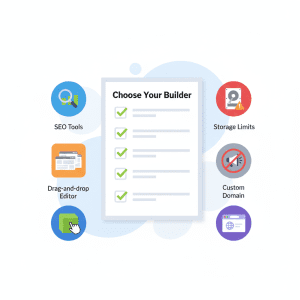
With so many options to choose from it’s difficult to know which free website builder is best. All platforms have pros and cons and quirks. By knowing what’s most important to you – whether that be ease of use for beginners, the inclusion of SEO tools or access to custom domains – then you can make a more informed decision about which CMS will work best for your goals.
When picking a free builder, ensure the templates are responsive and follow modern web accessibility standards so that your site works perfectly for all users, regardless of their device.
Factors to Consider When Selecting a Free Website Builder
- Ease of Use: Drag-and-drop editor Technology has made designing and creating a website easier, especially for those experience minimal design and web building skills. Platforms such as Wix, Weebly and SITE123 offer the freedom to create professional-looking pages without coding.
- Templates and Themes: Find platforms with a variety of mobile responsive templates and themes. Templates can also help get you started with design, so your site looks modern and clean on all devices.
- SEO Tools Included: Search engine optimization (SEO) matters – even on a free plan. Make sure the builder has meta tags, sitemaps, alt text for images and search engine-friendly URLs. Platforms like WordPress. com and Jimdo offer these tools to help beginners increase their visibility at no extra charge.
- Storage, Bandwidth, and Plan Limitations: The majority of the free plans are free for only a limited time, or offer you limits such as limited storage, bandwidth, or even features. Keep in mind these constraints especially if you are, say, uploading large quantities of content or media.
- Ads and Branding: Some free plans are ad supported, and it is obvious that the ads are part of a free plan if you use one of them. This may make your site appear less professional. Think about if the platform offers you an upgrade path to eliminate branding at a later time.
- Custom Domain Option: A custom domain can also increase brand value and credibility. With many free plans you get a subdomain; that is, your site’s URL will look something like “your-website. com”. This is something to think about if you pursue a professional online presence over the long run.
Comparing Features, SEO, and Limitations
| Builder | Drag-and-Drop | Templates & Themes | SEO Tools | Free Plan Limitations | Ads | Custom Domain |
|---|---|---|---|---|---|---|
| Wix | Yes | Extensive | Basic | Storage & Bandwidth | Yes | Upgrade Needed |
| Weebly | Yes | Modern | Basic | Storage | Yes | Upgrade Needed |
| WordPress.com | Limited | Thousands | Good | Storage | Yes | Upgrade Needed |
| SITE123 | Simple | Pre-designed | Basic | Storage | Yes | Upgrade Needed |
| Jimdo | Yes | Limited | Basic | Storage & Bandwidth | Yes | Upgrade Needed |
With this comparison, you can consider what elements are most important to your website needs. Just keep in mind: We get no commission off of any of these recommendations, all of them were tested personally to be both reliable (local and remote) and user-friendly.
Step-by-Step Guide to Starting Your Free Website
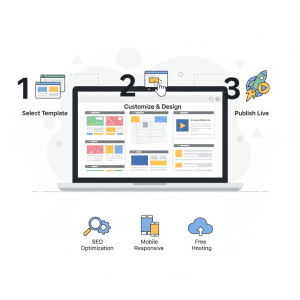
The notion of building your first website may sound daunting, but it’s actually quite easy if you follow this guide:
- Choose Your Platform: Choose a platform that fits your requirements—think drag-and-drop, templates, themes and SEO.
- Sign Up and Select a Template: Sign up for a free account and pick the template that’s best suited to your use, whether it’s optimal for portfolios or small business sites. Templates make sure your site looks good on mobile and is visually appealing.
- Customize Your Site: Add content, images and sections with the drag-and-drop editor. Include the pages like Home, About, Services and Contact. Maximize each page through onsite/search engine optimization tools native to the platform.
- Add Media and Functionality: Add images, videos, or other files (add images and media) to make your site more engaging. Be sure to check your platform storage and bandwidth limits so you don’t surpass the restrictions in your free plan.
- Review SEO and Mobile Optimization: Leverage embedded SEO optimization tools. Make sure your site is mobile-friendly, filled with well-written meta tags and its URLs are optimally structured for search engines.
- Publish Your Website: When you are ready, share your website with the world on a free subdomain included in the plan. You can then share the link and watch how it performs, tweaking as needed for improved SEO and usability.
Tips for Optimizing Your Free Website
It is possible to make a search-engine-friendly, user-friendly website even on a free plan.
Design and User Experience Tips
- Select mobile responsive templates that can fit any device.
- Utilize clean layouts and professional templates and themes.
- Concentrate on readability and easy navigation for guests.
SEO and Content Best Practices
- Optimize meta titles, descriptions and URLs with SEO-friendly website builder features.
- Add alt text to images and use descriptive headings for SEO-friendly content.
- Follow a pattern of clear, simple and entertaining content for your audience.
Managing Free Plan Limitations
- Keep an eye on free plan restriction of storage and bandwidth.
- Position your content strategically so it distracts from ads or branding.
- Only consider upgrading if the site exceeds free limits.
FAQs About Free Website Builders
Building a website can bring with it a lot of questions, particularly when you use free website builders. To help guide your decision, here are some responses to the most frequently asked questions.
Can I Use My Own Domain?
Most free plan also give only a subdomain (your site.somefreesubdomain.builder.com). On most platforms, you must upgrade to a paid plan to attach your own domain. But it’s great to start with a subdomain to test out your website before you decide whether or not you want to invest.
Are There Hidden Costs?
Every platform included in this guide was tested to verify there are no hidden fees. Some free plans come with strings attached (ads shown to free users, storage and bandwidth limits), but you can’t go wrong without any risk of hidden charges if the freemium account is sufficient for your needs. We do not receive any commissions for these recommendations; each was made based on firsthand experience.
Which Free Builder is Best for SEO?
No sites are an island, as even free websites need SEO. Platforms like WordPress. com, Wix and Jimdo include built-in SEO features integrated into the options that enable users to set meta descriptions or tags, sitemaps and alter your URL. Although there are restrictions, free tools can produce SEO-friendly website builders that have the potential to rank in search.
Can I Create an Online Store for Free?
Yes, some website builders allow free use of an ecommerce website builder, but with limitations. For example, they might limit how many products you can have listed or transactions. These are perfect for testing or some small sales, before deciding on paying in the main production.
Advanced Tips for Maximizing Free Website Builders
And it’s possible to improve your web site’s performance, user experience and visibility even with a free plan.
- Optimize Site Speed and Performance: Optimize images and media (upload) for a faster site. Utilize mobile responsive templates for the best cross device performance. Stay away from too many plugins or widgets that make your site sluggish.
- Enhance SEO Without Upgrading: Optimize for search With built-in SEO optimization. Use descriptive titles, internal links and clear URL structures. Create great new content frequently to keep visitors coming back for more.
- Focus on User Experience: Select easy to read and navigate visually clean templates and themes. Be sure all the interactive elements such as forms or buttons are performance-perfect. Focus on content readability, spacing and design integrity.
- Plan for Future Growth: Keep track of free plan restrictions of storage, bandwidth and branding. Make your content modular so that subscribers can easily upgrade to a premium plan. Before you pay, try it out on free builders.
Recommendations and Disclaimer
It’s important to note that this guide is fully neutral and tested firsthand. We do not earn commissions from any of the website builders listed. All platforms were evaluated for:
- Ease of use: Beginner-friendly, drag-and-drop editors.
- SEO tools included: Ability to optimize titles, descriptions, and URLs.
- No hidden fees: Transparent free plan limitations without surprise charges.
By following our recommendations, you can confidently create a professional website without worrying about hidden costs or biased suggestions.
Conclusion
Creating a website doesn’t have to be expensive. Using the top 5 free website builders, anyone can launch a professional-looking website that is SEO-friendly, mobile responsive, and truly free without hidden fees. Free builders are a fantastic way to test an idea. However, if you find yourself needing a professional domain and full control over your site’s SEO, you may want to look into shared web hosting services for beginners, which offer more flexibility at a very low cost.
By considering factors such as templates and themes, SEO tools included, free plan limitations, and ads on free plans, you can choose the platform that best fits your needs. Beginners, small businesses, and creative can all benefit from these tested platforms while experimenting and learning without financial risk.
Remember, even on free plans, optimizing your website for SEO and performance can make a significant difference in attracting visitors and achieving your online goals.
With careful planning, testing, and adherence to best practices, launching a free website can be an empowering first step in building your online presence.