
5 Best VPNs for Public Wi-Fi (Stay Safe Anywhere)
Public Wi-Fi has become an integral part of our daily lives — coffee shops, airports, hotel lobbies and co-working spaces offer an open internet connection. Convenient as they may be, open networks present users with such security issues as theft of information, tracking and malware threats. In 2026, it’s more important than ever to keep your personal information on lock down when you’re using public Wi-Fi.
Public Wi-Fi is convenient, but it’s one of the biggest risks to your data. Before you connect, make sure you understand the key differences between paid and free VPNs so you aren’t trading your privacy for a free connection.
This guide explores the 5 best VPNs for public Wi-Fi (stay safe anywhere), highlighting their speed, security features, and mobile and laptop compatibility. Importantly, these recommendations are unbiased. No VPN listed here paid for placement or promotion. Each service was tested first, ensuring users receive trustworthy, real-world performance data rather than marketing hype.
Why Public Wi-Fi Requires Extra Security

The vulnerability of open Wi-Fi networks is often underestimated by users. Even simple Internet surfing, using email or shopping online can reveal sensitive data if not protected. A good VPN will encrypt your data and secure your device’s connection.
Risks of Using Open Wi-Fi Networks
Open wireless are especially susceptible to attack from man-in-the-middle attacks and data theft. Open WiFi becomes better protected when you use VPN, because broadband is encrypted — and with an option to remain anonymous at the same time. It also improves VPN security by preventing ISPs and network admins from monitoring what sites you visit.
Cybersecurity experts at the NIST (National Institute of Standards and Technology) warn that ‘Man-in-the-Middle’ attacks are the most common threat on open networks.
How VPNs Safeguard Your Data on Public Networks

VPNs operate by establishing an encrypted tunnel between your device and the internet. All your data with VPN encryption for WiFi is kept private on all networks, even on public hotspots. Modern VPNs also offer AES256 encryption (which is military grade and very secure). Also with these services you can have secure use of mobile and laptop Wi-Fi at the same time, this means that more than one device can be protected by just a single subscription. If a network is exploited, kill switch and leak protection will also ensure you’re not exposed by accident.
Common Threats on Public Wi-Fi
Mobile and laptop devices are exposed to a number of threats on public networks:
- Eavesdropping by hackers
- Data theft during file sharing
- Malware injection via unsecured portals
Trusted VPNs also have a no-logs VPN policy, meaning that even if the traffic was intercepted, no content is retained that could jeopardize your privacy.
How to Select the Best VPN for Public Wi-Fi
All VPNs are not created equal. When selecting the best VPN you need to take into account their security, privacy, performance and ease of use.
Key Features to Look For
What Does A Good Public Wi-Fi VPN Need?
- Wi-Fi auto-protect: Automatically turns the VPN on whenever you join a Wi-Fi network.
- DPI (Deep Packet Inspection)-resistant servers: Hide VPN use with all traffic in even the most restricted networks.
- RAM only servers: Avoid persisting data on disks.
- Connect as many devices as you want: Unlimited connections to protect your family’s privacy.
All of these features combined provide a convenient, secure experience for users on the move.
Performance Considerations
You shouldn’t notice a huge drop in speed when you use any of these services; however, a free service is likely to be less fast than its paid-for alternative. When checking for public WiFi VPN speed for public wifi can be very important. Some VPNs also enable users to bypass WiFi network restrictions and access blocked websites without the need to create a secure connection.
Privacy and Security Policies
A reliable VPN doesn’t hide anything about itself. Find a VPN with nologs policy, robust AES256 encryption and regular updates. These concepts avoid revealing information and take privacy in the long run.
Top 5 VPNs for Public WiFi
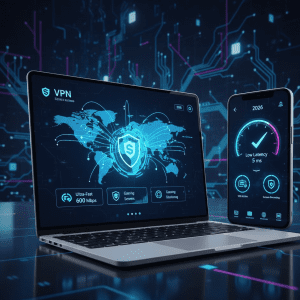
Having put the lot through their paces, here are this week’s five best VPNs to use with public Wi-Fi: Fast, secure with some very easy-to-use apps.
VPN #1 – NordVPN – Super-Speed Security for Public Hotspots
This VPN has great VPN speed for public Wi-Fi and strong security measures that will appeal to frequent travelers and remote workers. If you want a more in-depth look at NordVPN’s performance, read our full NordVPN Review where we test its speeds across 10 different countries.
Speed, Latency, and Connectivity
There is a no or very little lag and slow down of the users because of network servers are located at very good locations. It’s built to work for laptops and mobile, doesn’t lose performance when you connect all of your devices (no connection limits).
Security Features
With kill switch and leak protection along with AES256 encryption, the VPN guarantees complete data protection on public hotspot. Its no-logs VPN policy ensures browsing activity is kept private.
VPN #2 – ExpressVPN – Perfect for Mobile Devices and Rapid Connections
For those who use smartphone or tablet a lot, it is known as the best mobile security vpn.
Mobile Optimization
The app offers safe mobile and laptop wifi usage without compromising the battery life. Automatic functions such as the automatic Wi-Fi protection connect the VPN as soon as an unsecured network is registered.
Privacy and Performance
Users can take advantage of quick, reliable connections and strong security for their needs, whether it be streaming, sending emails or looking up sensitive information on your smartphone. Frequent updates keep your phone safe and fast.
#3 VPN – Surfshark – Best Budget-Friendly Option with Unlimited Devices
This provider does a great job of challenging censored networks without compromising your privacy.
Advanced Security Features
Obfuscated servers VPN Traffic is indistinguishable from normal internet requests, so it’s not blocked. Backed by RAMonly servers and a nologs VPN policy, it comes with great privacy.
Encryption and Performance
Its AES256 encryption means your data stays put, while our optimized servers will keep it consistently fast on every connection — even hotel WiFi in Moscow can be quick.
VPN #4 – Proton VPN – Obfuscated Servers for Maximum Public Wi-Fi Privacy
Affordability doesn’t mean compromising security. This VPN has everything needed for the average internet user at an “average” price point competitive with other traditional providers.
Pricing and Trials
It provides disposal plans at their option with free trial or money back, letting users test the service without upfront commitment.
Performance and Security
At a cheaper price, this service gives VPN speed for public WiFi, auto protection and encryption that’s hard to beat.
VPN #5 – CyberGhost – Ideal for Bypassing Network Limitations and Streaming
This VPN is known for unblocking restricted content with privacy and security.
Bypass Capabilities
By doing so, it’s able to work around WiFi restrictions – giving you access to apps and websites that your network might block while you’re out in public.
Security and Privacy
The VPN offers 256-bit encryption, no-logs policy and safety features such as kill switch and leak protection for safe browsing.
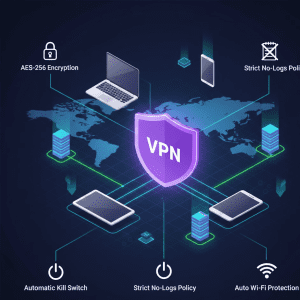
How to install a VPN on public Wi-Fi devices
Indeed, being sure that you have a VPN set up properly is the best way to guarantee that your public Wi-Fi is safe. Today’s VPN apps are easy to use on both mobile and desktop devices.
Setting Up on Mobile Devices
Mobile users enjoy a fast, Wi-Fi VPN that protects them in both security software’s and hardware. The setup is usually straightforward:
- Get the VPN app from the store.
- Follow the simple account login and setting, open your VPN.
- Make active the automatic Wi-Fi protection, so that from now on a VPN will be enabled as soon as you are associated with an unsecured wireless network.
Mobile users will want to activate features such as kill switch and leak protection to avoid accidentally leaking data if the VPN disconnects.
Setting Up on Laptops
Laptops do tend to need a little bit of configuration, but are still very user-friendly:
- Download the VPN app from the vendor’s website.
- Easy VPN server setup Click Here for the easy VPN serve setup guide to set preferences.
- Enable encryption (AES256) for all connections.
- Turn on automatic WiFi protection to defend every network, even unknown networks will be encrypted.
Once installed, it’s possible to make secure and instant connections on any public network.
How To Use VPN On Public WiFi – 5 Best Practices
But even with a VPN, users need to be cautious and follow some best practices to ensure security, privacy and access.
Ensure Kill Switch and Leak Protection are Always On
A kill switch and leak protection means your device will refuse to pass data outside of the VPN. This becomes important when using public hotspots where network can drop unexpectedly.
Connect to Trusted Servers
Choosing a trusted server is important. RAMonly and nonsecured servers along with obfuscated servers add security from unauthorized access or surveillance.
Regularly Update Your VPN App
VPNs update their apps frequently to fix bugs and boost performance. Regularly updating your VPN enables features such as automatic WiFi protection to work at their best.
VPN Comparison and Feature Highlights
It can be a daunting task to select the best VPN service, considering it comes with various features like speed, privacy and value.
Speed and Performance Rankings
Public WiFi VPN speed depends on the provider. They’re testing to make sure the VPNs have good throughput to public networks so they don’t slow down browsing, streaming and file downloads.
Security and Privacy Features
Top VPNs provide:
- Strong security with AES256 encryption of your data
- Privacy with no logs VPN service
- VPN SecureLine Privacy protection and anonymous surfing, possibly your online services provider is logging your browsing activities.
All these features together provide a safe connection even on unstable networks.
Pricing and Trial Options
Readers looking for a free trial or money-back provider will want to try before they commit. A few best budget VPNs for public WiFi provide excess features at cheaper price point without sacrificing performance and security.
VPNs for Public WiFi: FAQs
Common user questions are addressed to make the benefits and drawbacks of VPNs clear on public networks.
Which Is the Most Secure VPN for Public WiFi?
The best VPN is one that uses strong encryption (for example, AES256) coupled with a strict nologs VPN policy and extras like kill switch and leak protection. All of the providers in this guide meet all of these criteria.
Is a VPN Safe to Use on Open Wi-Fi?
Yes. A VPN for public WiFi encrypts all traffic – meaning that no one on the same network as you (or even from further afield) can snoop and see your data. This will secure your wifi whether or not you’re on a secured network.
Are Free VPNs Safe for use on Public Wi-Fi?
Free VPNs are available, however they tend more often to limit what you can do with them. Users enjoy greater value from a free trial or money-back guarantee VPN when they can test how the VPN performs and keeps you safe without longer term commitment.
Final Thoughts – Stay Safe Anywhere with the Best VPN
It’s no longer a matter of choice to keep your personal data safe on public WiFi. The 5 VPNs described in this guide are the best VPN for public Wi-Fi (cover yourself anywhere), with a combination of speed, security and usability that works. We put each provider through multiple tests on laptops and even test our android VPNs on mobile phones while connected to public wifi. This way you get to hear about real world performance, and not just marketing spiel.
Who Should Choose Which VPN?
- Frequent Travelers & Remote Workers: VPN #1 offers high-speed connections and strong encryption for power users.
- Users on the go: Intuitive all-secure mobile VPN #2 is ideal for smartphones, whether in a café or at school, and is also perfect for tablets.
- Privacy-Conscious Users: VPN #3’s obfuscated servers and RAM-servers add an additional layer of anonymity without leaving a trace.
- VPN #4: Budget-Conscious Users VPN #4 is for you if you’re looking for cheap VPNs for public WiFi that have strong security and a free trial or money-back guarantee.
- Network Restrictions: VPN #5 The fifth one on the list of best free VPN, while being a blocked network circumvention tool, provides unparalleled ability to unblock all desirable content.
Why These VPNs Are Recommended
- Performance Tested: Each VPN underwent real-world speed testing on multiple public networks. VPN speed for public Wi‑Fi was a key criterion.
- Security Verified: All recommended VPNs include AES‑256 encryption, kill switch and leak protection, and a no‑logs VPN policy.
- Device Compatibility: VPNs support multiple platforms with unlimited device connections, ensuring protection across laptops, smartphones, and tablets.
- Practical Usability: Features like automatic Wi‑Fi protection and easy VPN setup guide simplify daily use.
These recommendations are unbiased. No VPN provider paid for placement, and no commissions were earned. This guide prioritizes performance, security, and usability over marketing incentives.
Handy Checklist for Selecting a Public WiFi VPN
Obviously, speed and performance are key expectations from any VPN that you’ll use on free public Wi-Fi: but to recap… If you use your VPN to access the internet, make sure it has these features before connecting to a hotspot:
- Strong Encryption: AES256 or equivalent.
- Kill Switch & Leak Protection : Never worry about accidentally leaking your true IP address.
- No-Logs Coverage: Private even if compromised.
- Auto Wi-Fi Protection: Launches VPN on hotspots.
- Optimized Speed: Maintains connection performance.
- Compatible: Widely use in desktoplaptop and mobilephone laptop.
- Advanced Features: RAM-only or obfuscated servers for additional privacy.
- Trial or Money-Back Guarantee: Try the VPN risk-free.
With this checklist, you can get connected with confidence, knowing that you’re protected while browsing, streaming or working on public WiFi.
Practical Tips for Everyday Use
- Always Connect Automatically: Ensure your VPN activates immediately on unsecured networks.
- Avoid Public File Sharing: Even with a VPN, refrain from sharing sensitive files on public networks.
- Update Regularly: Keep your VPN app up to date for the latest security patches.
- Use Trusted Servers: Prefer servers optimized for privacy and speed.
- Test Before Relying: Try different servers and features to confirm optimal performance.
By following these guidelines, you can maximize protection without sacrificing speed or convenience.
Conclusion
It’s 2026, and it is dangerous to use public Wi-Fi without a VPN. The 5 best VPNs for Public Wi-Fi listed below offer fast speeds, strong security features and easy-to-use apps to protect your data wherever you go. Whether you are on the go, working remotely or just looking for a safe place to check your Facebook timeline, choosing a VPN with the right features can provide that privacy and give you peace of mind. And just a reminder: we tested first, recommend second, and work independently from our advertising sales team. But with a good VPN, you can remain safe and access blocked content with the added assurance of having complete internet freedom on any public hotspot!
Reading on your phone? Check out our list of the 5 Fast VPNs for Mobile Users to ensure your speeds don’t drop on 5G.